CCTV

CCTV Bandwidth & NVR Storage Calculator

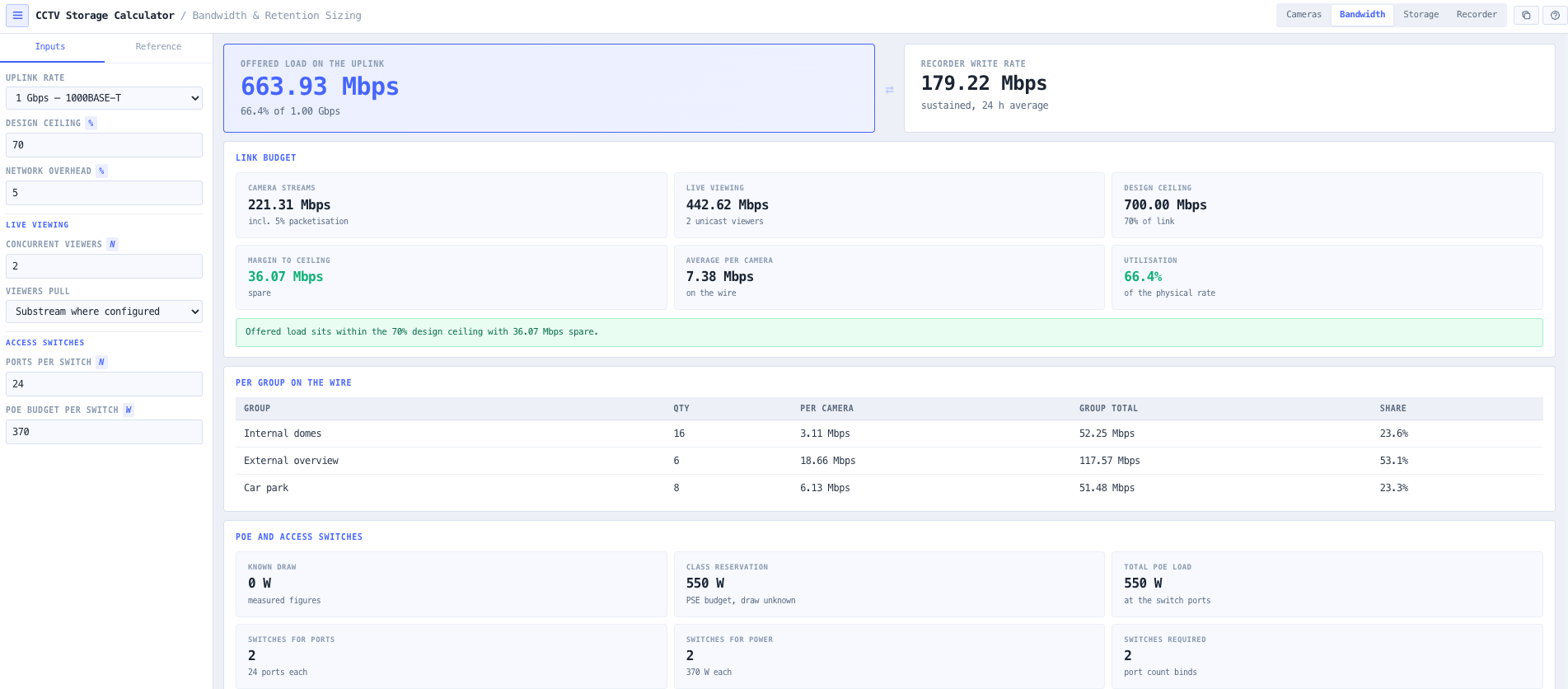
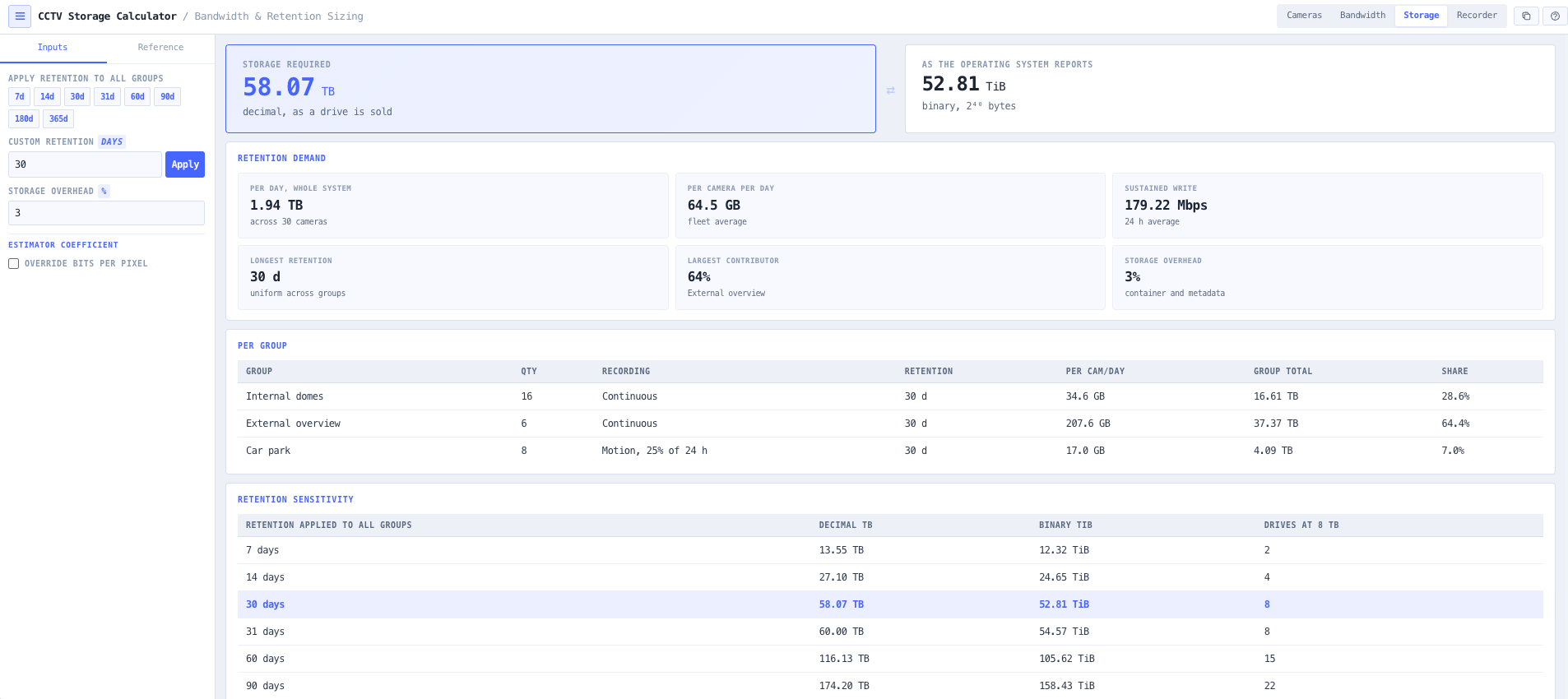
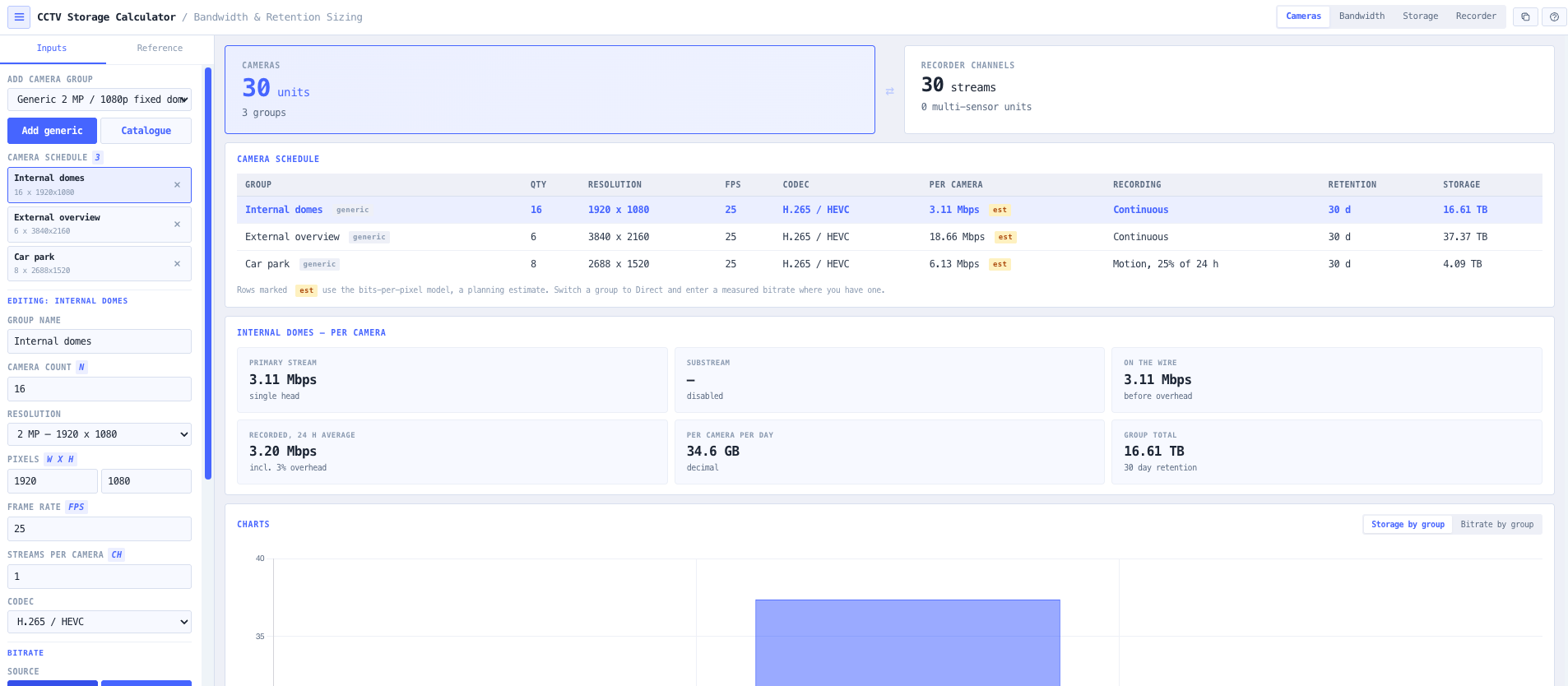
Work out how much NVR storage a camera fleet needs to hold a required number of days, and whether the network will carry it. Build a schedule of camera groups, each with its own resolution, recording mode and retention period, then size the recorder, as a custom build or one of 65 real catalogue configurations, against capacity, sustained write rate and channel count.

Overview

Every surveillance design starts with the same two questions. How much storage does this fleet need to hold the retention the client asked for, and will the network carry it. Both are simple arithmetic, and both are routinely got wrong, because the inputs are less certain than they look and the unit conventions quietly disagree with each other.

The first uncertainty is bitrate. No camera datasheet publishes a stream bitrate, because bitrate is not a property of the product. It is a property of the encoder settings and the scene in front of the lens. Of the 154 real cameras in the noIM3 component catalogue, exactly one mentions a bitrate anywhere in its specifications. This tool therefore does not pretend otherwise. Enter a measured or specified figure and it is used exactly as entered. Use the bits per pixel model instead and every figure it produces is marked as an estimate, with the coefficient visible in the reference panel and editable in the inputs.

The second is that a real site is never uniform. A car park recording on motion for thirty days and a reception recording continuously for ninety days are two different storage problems, and averaging them produces a number that is wrong for both. The schedule here is built from groups, each carrying its own stream definition, recording mode and retention period, so a mixed site sizes correctly in one pass.

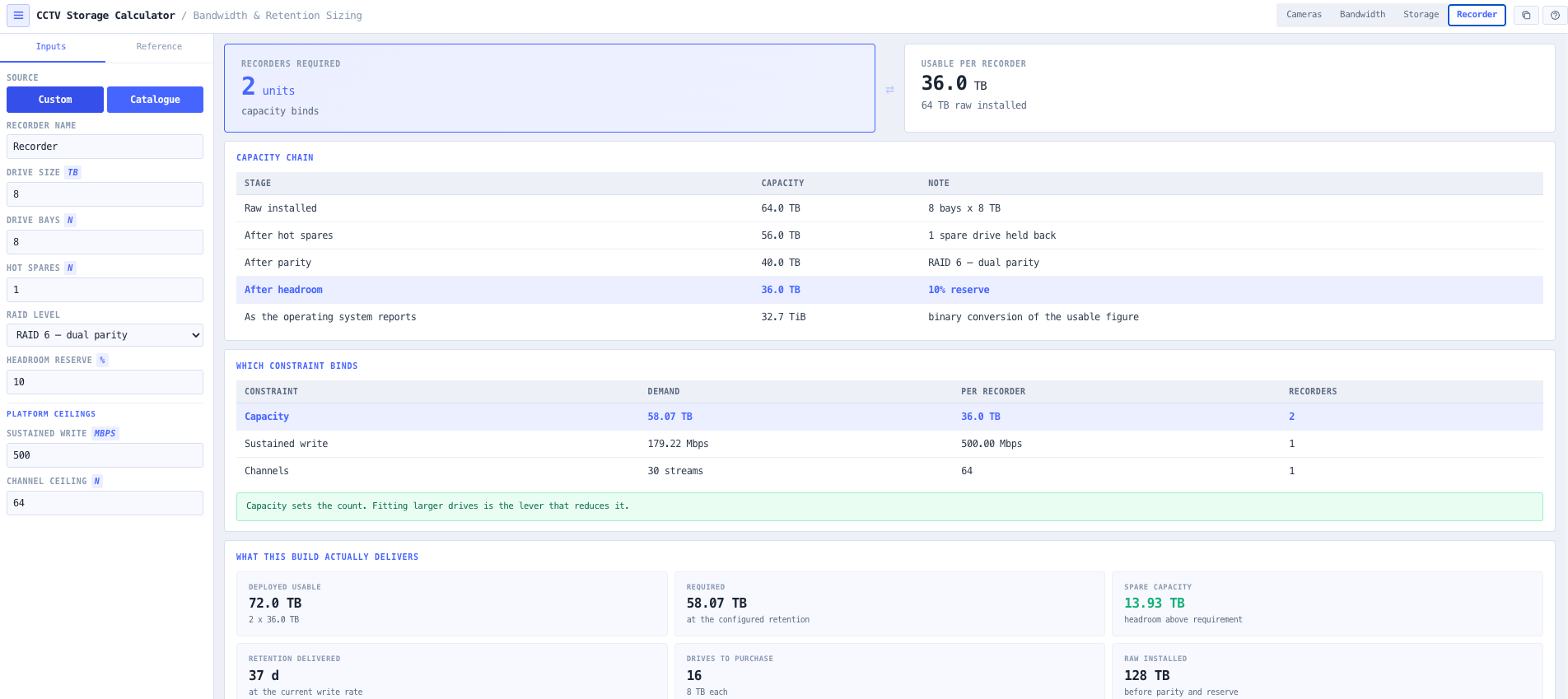
The third is that capacity is not one number. Drives are sold in decimal terabytes and reported by the operating system in binary tebibytes, and a ten terabyte drive presents as 9.09 tebibytes. RAID parity, hot spares and the headroom reserve take more out again. And once all that is accounted for, the recorder count is often set not by capacity at all but by the sustained write ceiling or the channel limit, which no amount of extra drive capacity will fix. The tool walks that whole chain and names the constraint that actually binds.

Capabilities

A camera schedule, not one global setting

Cameras are entered as groups of identical units, each with its own resolution, frame rate, codec, scene complexity, recording mode and retention period. A site that keeps thirty days on the car park and ninety on the entries sizes correctly in a single pass, with each group's contribution to bandwidth and storage reported separately.

Measured bitrate or a clearly labelled estimate

Direct mode takes a measured or specified figure in Mbps and uses it verbatim. Model mode estimates from resolution, frame rate, codec and scene complexity, and marks every figure it produces as an estimate on the row, in the summary and in the clipboard export. The bits per pixel coefficient is shown in the reference panel and can be overridden to match a stream you have actually measured.

Network and storage overheads applied separately

Packetisation overhead from RTP, UDP and IP headers applies to what crosses the wire. Container, index and video management metadata apply to what lands on disk. They are genuinely different quantities, so the tool keeps them separate and editable rather than carrying one figure and applying it to both.

Decimal terabytes and binary tebibytes, side by side

Storage is reported both as the decimal terabytes a drive is sold in and the binary tebibytes the operating system shows. The two differ by about nine percent, which is exactly the gap that turns a nominally adequate array into a short one at commissioning.

The full capacity chain, not just raw times bays

Raw installed capacity, then hot spares removed, then RAID parity charged in whole drives, then the recording headroom reserve. RAID 5 loses one member, RAID 6 loses two, mirrored levels lose half, and an array with too few members for the level is reported as unbuildable rather than quietly producing a number.

65 real recorder configurations, or your own build

A custom build is specified as drives, bays, hot spares, RAID level and headroom. A catalogue recorder is picked from 65 configurations normalised across eight product families and quoted at its published usable capacity, channel ceiling and write rate, with the verbatim datasheet wording beside every figure. Those ceilings depend on how the recorder is connected, so the network connection is an explicit input, the conservative figure is the default, and a mode the vendor does not offer reports no figure rather than falling back.

The binding constraint named explicitly

Capacity, sustained write rate and channel count are each a hard ceiling, so the recorder count is the largest of the three. The tool says which one binds, because a design short on throughput is not fixed by fitting larger drives, and neither is a design short on channels.

Multi sensor cameras counted correctly

A four head multi sensor camera is one unit on one cable drawing from one PoE port, but four encoded streams and four recorder channels. Counting it as one channel understates the recorder requirement fourfold, so channels are tracked in streams throughout.

PoE reported at the switch, not at the camera

PoE load uses PSE figures, the power reserved at the switch port. 802.3af reserves 15.4 W to deliver 12.95 W at the camera, so sizing a switch on the powered device figure under counts by about sixteen percent. Cameras with no power data are counted and surfaced rather than assumed to draw nothing.

Optional catalogue of 154 real cameras

The tool runs on labelled generic camera classes and needs no database. An optional picker seeds a group from 154 real catalogued cameras, filling in resolution, maximum frame rate, codec support, imager head count and PoE class, and listing any field it could not read from the row rather than defaulting it silently.

Standards & methodology

  • IEEE 802.3af, 802.3at and 802.3bt Power over Ethernet
  • ITU-T H.264 and H.265 video coding
  • ONVIF Profile S and Profile G interoperability
  • IEC 62676 video surveillance systems for security applications
  • AS/NZS 3000 and AS/NZS 3084 for the supporting infrastructure

When to use this tool

  • Sizing NVR storage for a required retention period across a mixed camera fleet
  • Answering a client asking what ninety days of retention costs against thirty
  • Checking whether a 1 GbE uplink will carry a fleet with headroom for playback
  • Sizing the access switch count from PoE budget rather than port count alone
  • Working out how many recorders a site needs and which constraint sets that number
  • Comparing continuous against motion recording on the storage bill
  • Validating a vendor storage quotation against an independent calculation
  • Turning a binary tebibyte requirement into a decimal terabyte drive schedule
  • Sizing a design that mixes retention periods by zone in one pass
  • Checking a multi sensor camera fleet against a recorder channel ceiling
  • Producing a defensible storage figure for a tender response with assumptions attached
  • Sanity checking a bitrate estimate against a measured stream from a commissioned camera

Is this the right tool for you?

Reach for the CCTV Bandwidth & NVR Storage Calculator in any of the following situations.

  • A thirty camera retail site keeps ninety days on eight entry cameras and thirty days on the rest. Two groups, two retention periods, one total, and the per group table shows the entries account for most of the archive despite being a quarter of the fleet.
  • A design comes back short at commissioning. The quotation was sized in binary tebibytes against drives sold in decimal terabytes, and the nine percent gap plus a ten percent headroom reserve accounts for the shortfall. Both conventions are reported side by side here so the discrepancy is visible before the drives are ordered.
  • A sixty camera 4K fleet fits comfortably inside the recorder capacity but exceeds its sustained write ceiling. The tool reports capacity needing one recorder and throughput needing three, names throughput as the binding constraint, and says plainly that larger drives will not help.
  • A car park is moved from continuous to motion recording at twenty five percent activity. Storage drops to a quarter, but the uplink figure does not move, because the link still has to carry every camera triggering at once.
  • Twenty multi sensor four head cameras look like twenty channels on the quotation and are actually eighty. The channel ceiling binds long before capacity does.

Frequently asked questions

Why does the tool not just look up the bitrate for my camera model?

Because no camera datasheet publishes one. Bitrate is a property of the encoder settings and the scene in front of the lens, not of the product: the same camera on a static corridor and on a busy forecourt produces very different streams. Of the 154 real cameras in the noIM3 component catalogue, exactly one mentions a bitrate anywhere in its specifications. Selecting a catalogue camera here seeds its resolution, frame rate, codec support, head count and PoE class, and leaves the bitrate to your measured figure or to the model, which labels itself as an estimate.

How accurate is the bits per pixel estimate?

It is a planning estimate and is captioned as one everywhere it appears. The model computes Mbps as width times height times frame rate times bits per pixel times a codec factor, with four scene complexity bands from 0.05 to 0.20 bits per pixel defined at H.264. As an anchor, 1080p at 25 frames per second on the Medium band computes 5.18 Mbps, which sits mid range against published H.264 tables. It is good enough to size a system and to have a budget conversation. It is not a substitute for measuring a commissioned stream, and where you have a measured figure the Direct mode uses it verbatim.

Why is the storage number different from the vendor calculator I used?

Usually one of three reasons. Vendor calculators often carry a single overhead figure and apply it to both bandwidth and storage, where this tool applies packetisation overhead to the wire and container overhead to the disk separately. They often report in one unit convention without saying which, where this tool reports decimal and binary side by side. And they usually assume a smart codec saving by default, where this tool defaults that to zero because the saving is entirely scene dependent and headline figures are best case. Set the assumptions to match and the numbers converge.

What is the difference between TB and TiB, and why does it matter?

A decimal terabyte is 10 to the twelfth bytes, which is how drives are sold. A binary tebibyte is 2 to the fortieth bytes, which is what the operating system reports. A ten terabyte drive presents as 9.09 tebibytes, a difference of about nine percent. Size an array in one convention and buy drives in the other and the result is a shortfall that only appears once the archive fills. Both figures are shown throughout so the conversion is never left implicit.

Why does the recorder count sometimes not go down when I fit larger drives?

Because capacity is not the constraint that binds. A recorder has three hard ceilings: how much it can store, how fast it can write, and how many channels it can accept. The count is the largest of the three, and the tool names which one it is. If sustained write rate or channel count binds, larger drives change nothing and the answer is to split the fleet across more recorders, reduce the stream load, or specify a platform with a higher ceiling.

How are multi sensor cameras handled?

A multi sensor camera is one physical unit on one cable drawing from one PoE port, but each imager head encodes its own stream. So a four head unit is one camera, one port, four streams and four recorder channels. The tool tracks channels in streams throughout, and the catalogue adapter reads the head count from the structured resolution rating, so a four by eight megapixel unit seeds four channels automatically.

Does the motion recording model account for pre and post roll?

Yes, through the idle rate. Motion mode records at the full rate for the active fraction of the recording window and at a stated percentage of the full rate for the remainder. Set the idle rate to zero and nothing is written between events. Set it above zero to model pre and post roll buffers or a reduced rate idle stream. Storage is charged on the resulting twenty four hour average, while bandwidth is still charged at the peak, because the link has to carry every camera triggering at once.

Why does the PoE figure look higher than the sum of my camera datasheets?

Because it is reported at the switch port, not at the camera. The 802.3af standard reserves 15.4 W at the power sourcing equipment to deliver 12.95 W at the powered device, and a switch power budget is consumed at the port. Sizing a switch on the powered device figure under counts by about sixteen percent, which is a common way to overload a supply. Cameras with a measured draw use that figure; cameras without one fall back to the class reservation.

Does the tool need the component catalogue to work?

No. It is built on labelled generic camera classes and is fully usable with the catalogue unreachable. The catalogue picker is an optional convenience that seeds a real camera's capability envelope, and if it fails to load the tool says so and carries on with the generic classes.