Network Design

PoE Power-Budget Planner

Plan the PoE loading of one switch or a whole stack. Add PoE switches, add the powered devices on each, and see how loaded every switch is in watts and in ports, with the headroom and every over-budget or over-port warning.

Overview

A PoE switch runs out of power before it runs out of ports. Behind a row of "48 PoE+ ports" sits a single power budget the supply can deliver across all of them, and a floor of cameras, access points and readers can spend that budget long before every port is used. The recurring question on any install is simple: will this switch carry the load, and if not, how far over is it. The PoE Power-Budget Planner answers exactly that.

You add the switches you are planning, from a catalogue of PoE-capable models where the budget, the per-port maximum and the PoE port count come straight from the datasheet, or as generic 8, 24 and 48 port shapes you can edit. Then you add the powered devices on each: real cameras, Cambium PtMP radios and access-control devices from the catalogue, generic presets with typical draws, or a custom entry where you type the draw and pick the PoE class. Each device carries a quantity and the switch it belongs to.

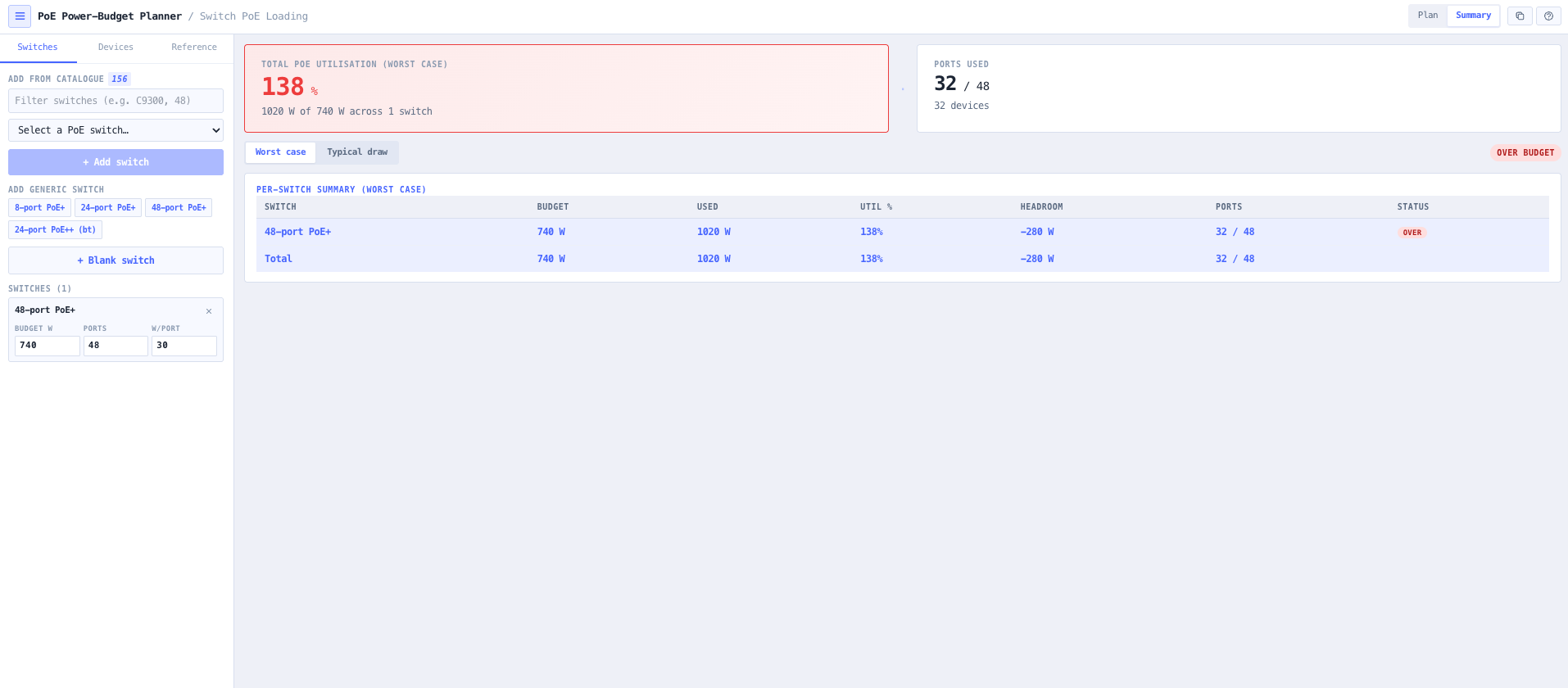
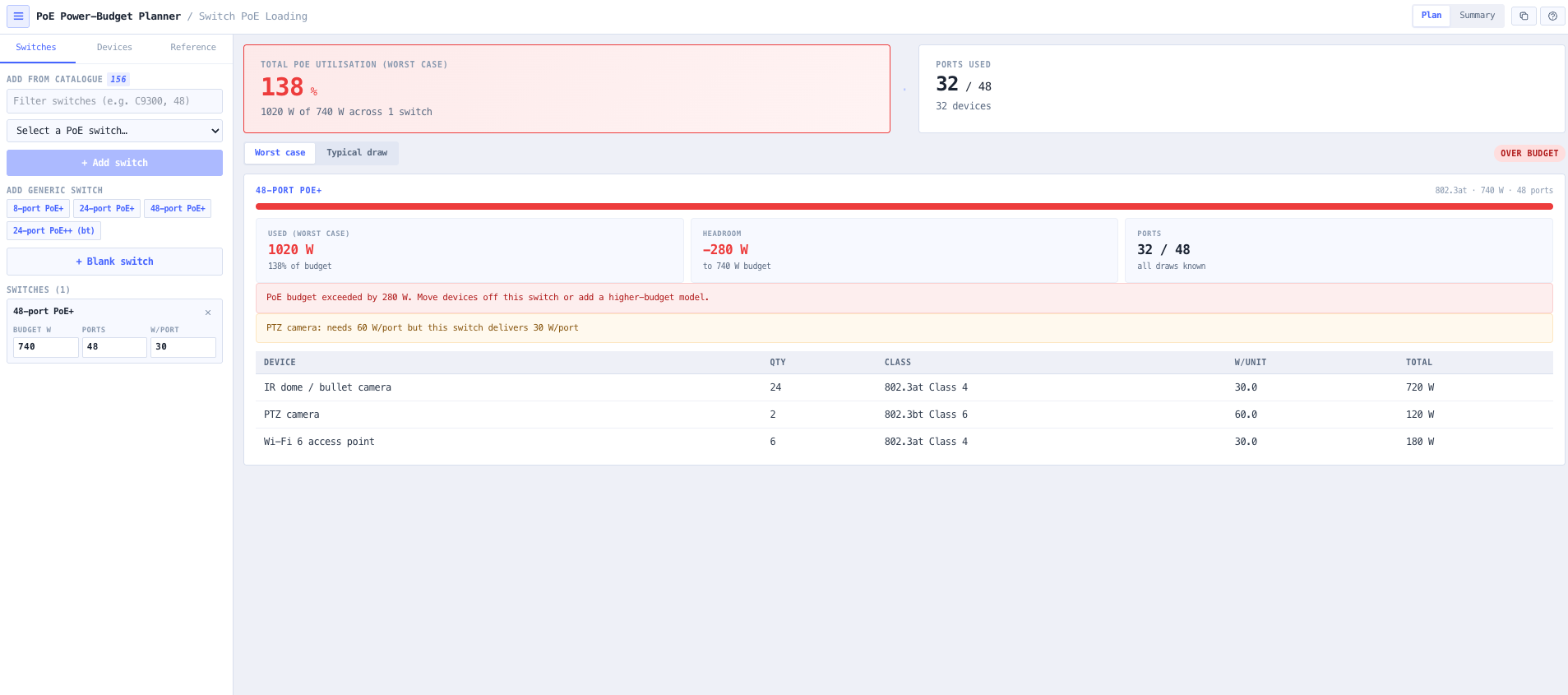
The tool then reports, per switch, the used watts against the budget, the headroom, the ports used against the ports available, and a rolled-up total across the whole stack, colouring each switch by how close it is to its limits. It is scoped for the integrator sizing PoE against a switch, not for cable-run voltage drop or injector design, and every device figure stays editable so a catalogue starting point becomes your own number.

Capabilities

One switch or a whole stack

Add as many switches as the design has. Each is planned on its own PoE budget and port count, and the headline card and the summary table roll the whole set up into a total. Auto-balance spreads the unassigned devices across the switches by remaining headroom, so a first pass at a multi-switch layout takes seconds.

Two limits tracked, not one

A switch has two ceilings: the total power budget its supply delivers, and the per-port maximum set by the PoE standard. The planner tracks both, reports the used watts against the budget and the ports used against the port count, and warns when a device needs more per-port power than the switch can deliver.

Sized on the PSE figure

A switch reserves power at the port above what the device receives: 802.3af reserves 15.4 W to deliver 12.95 W. Sizing on the device figure under-counts by around 16 percent. The worst case view uses the port reservation, so the budget you plan is the budget the switch actually spends.

Real devices from the catalogue

Cameras, Cambium PtMP radios and access-control devices come from the real catalogue, with their rated draw and PoE class where the datasheet gives them. Generic presets cover the common loads the catalogue does not, and a custom entry takes any draw and class you type.

Honest about the gaps

Access-control datasheets give voltage and idle current only, so their draw is left for you to enter, not invented. PtMP radios are passive-injector powered rather than 802.3 class-negotiated, so they are sized on watt draw with no class. Any device with neither a draw nor a readable class is flagged and left out of the total, never assumed to draw zero.

Browser only computation

Runs entirely in your browser. The switch and device libraries are fetched from the catalogue behind your login, and nothing about your design is submitted to a third party service. Useful for commercially confidential work or any environment where information security policy prohibits sending engineering data off site.

Standards & methodology

  • IEEE 802.3af PoE, PSE port reservation of 4 to 15.4 W by class
  • IEEE 802.3at PoE+, PSE port reservation of 30 W at Class 4
  • IEEE 802.3bt PoE++, PSE port reservation of 45 to 90 W across Class 5 to 8
  • Switch sized on the PSE port reservation, above the PD delivered power

When to use this tool

  • Checking whether a 48 port PoE+ switch has the power budget to carry a full camera floor before ordering it
  • Sizing the switch supply for a mixed load of cameras, access points and access-control readers
  • Spreading a device pool across a stack of access switches so no single switch is over budget
  • Confirming a switch delivers enough per-port power for an 802.3bt PTZ or a high-power access point
  • Comparing two candidate switches on how much headroom each leaves for the same device list
  • Working out how many more devices a switch can take before it hits its PoE budget
  • Estimating the everyday PoE draw of a floor for thermal and energy planning using the typical view
  • Documenting the PoE budget of every switch in a design in one copy-paste summary

Is this the right tool for you?

Reach for the PoE Power-Budget Planner in any of the following situations.

  • You are speccing an access switch for a floor of 40 cameras and eight access points and need to know whether a 370 W budget will carry it or whether you need the 740 W model.
  • You have a PTZ camera that negotiates 802.3bt Class 6 and want to confirm the switch delivers 60 W on that port, not just 30 W.
  • You are laying out three access switches for a building and want the devices spread so none is over its PoE budget.
  • You are adding a Cambium PtMP radio to a switch and need its 110 W worst-case draw counted against the budget even though it is not 802.3 class-negotiated.
  • You are pricing two candidate switches and want to see which leaves more PoE headroom for the same device list.
  • You are handing a design to a client and want the PoE budget of every switch in one summary you can paste into a report.

Frequently asked questions

What does a PoE power-budget planner work out?

It tells you how loaded a switch is on PoE. You add the switch, with its total PoE budget and its port count, and the powered devices on it, and the tool reports the used watts against the budget, the headroom, and the ports used against the ports available. Across several switches it rolls the whole stack up into a total and warns wherever a switch is over its budget or its port count.

Why size a switch on the PSE figure rather than the device draw?

A switch reserves power at the port above what the powered device actually receives. 802.3af reserves 15.4 W at the port to deliver 12.95 W at the device, and the higher classes reserve similarly. Sizing on the device figure under-counts the load by around 16 percent, which is a common way to overload a supply. The worst case view uses the port reservation so the budget you plan matches the budget the switch spends.

What is the difference between worst case and typical draw?

Worst case sizes each device at the larger of its PoE class reservation and its rated draw, which is the figure a switch power supply must plan for. Typical uses the rated draw where the catalogue gives one, which is closer to the everyday load and useful for thermal and energy estimates. Size the switch on worst case.

Where do the switches and devices come from?

Switches and devices come from the noim3 catalogue behind your login: PoE-capable switch models with their budget and port count from the datasheet, real cameras with their draw and PoE class, Cambium PtMP radios, and access-control devices. Generic presets cover the common loads the catalogue does not, such as Wi-Fi access points and VoIP phones, and a custom entry takes any draw and class you type.

How are devices with no power figure handled?

They are flagged, not guessed. Access-control datasheets give voltage and idle current only, so their draw is left for you to enter. PtMP radios are passive-injector powered rather than class-negotiated, so they are sized on watt draw with no class. A device with neither a draw nor a readable class is counted as unknown and left out of the total rather than assumed to draw zero.

Does any data leave my browser?

The calculation runs entirely in your browser. The switch and device libraries are fetched from the catalogue behind your login, but nothing about your design is submitted to a third party service, which suits commercially confidential work and any environment where information security policy prohibits sending engineering data off site.