Frequency Coordination

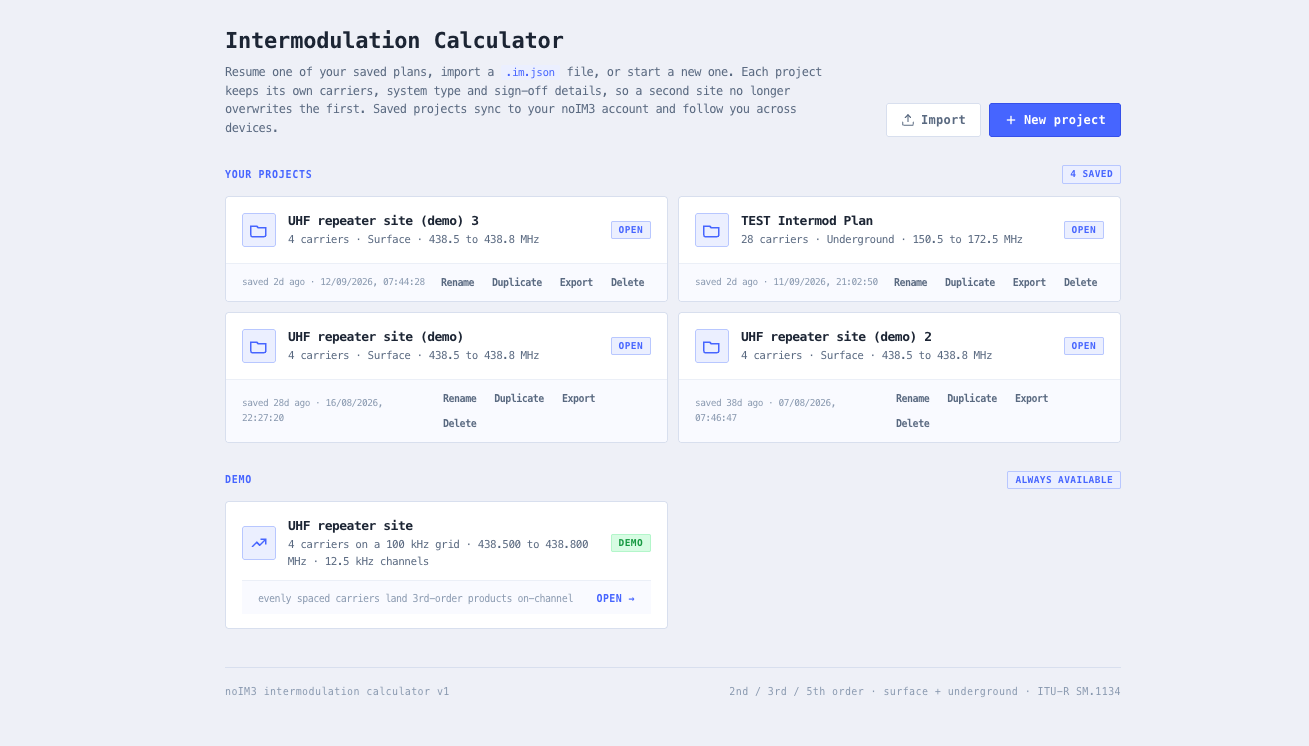
Intermodulation Calculator

ITU aligned intermodulation analysis for multi carrier radio systems. 2nd, 3rd, and 5th order products, surface and underground modes, real time system scoring, and an interactive spectrum view.

Free forever on a Standard account. No credit card.

Overview

Intermodulation is the dominant cause of self generated interference in multi carrier radio systems. When two or more transmitters share a site, or when a single radio is exposed to several strong nearby signals, mathematical sums and differences of those carriers appear at predictable frequencies. If one of those products lands on a working channel, the result is in band interference that masks weak signals, breaks up audio, and triggers complaints that are notoriously hard to diagnose once the network is in service.

The noIM₃ Intermodulation Calculator computes 2nd, 3rd, and 5th order intermodulation products for any list of carrier frequencies using ITU aligned methods. It supports both surface and underground analysis modes. Surface mode evaluates the full 2nd, 3rd, and 5th order set typical of open air radio deployments. Underground mode includes both two signal (2F1 minus F2) and three signal (F1 plus F2 minus F3) 3rd order products that dominate in confined environments such as mines, tunnels, and metro radio systems where higher orders are heavily attenuated by structure loss.

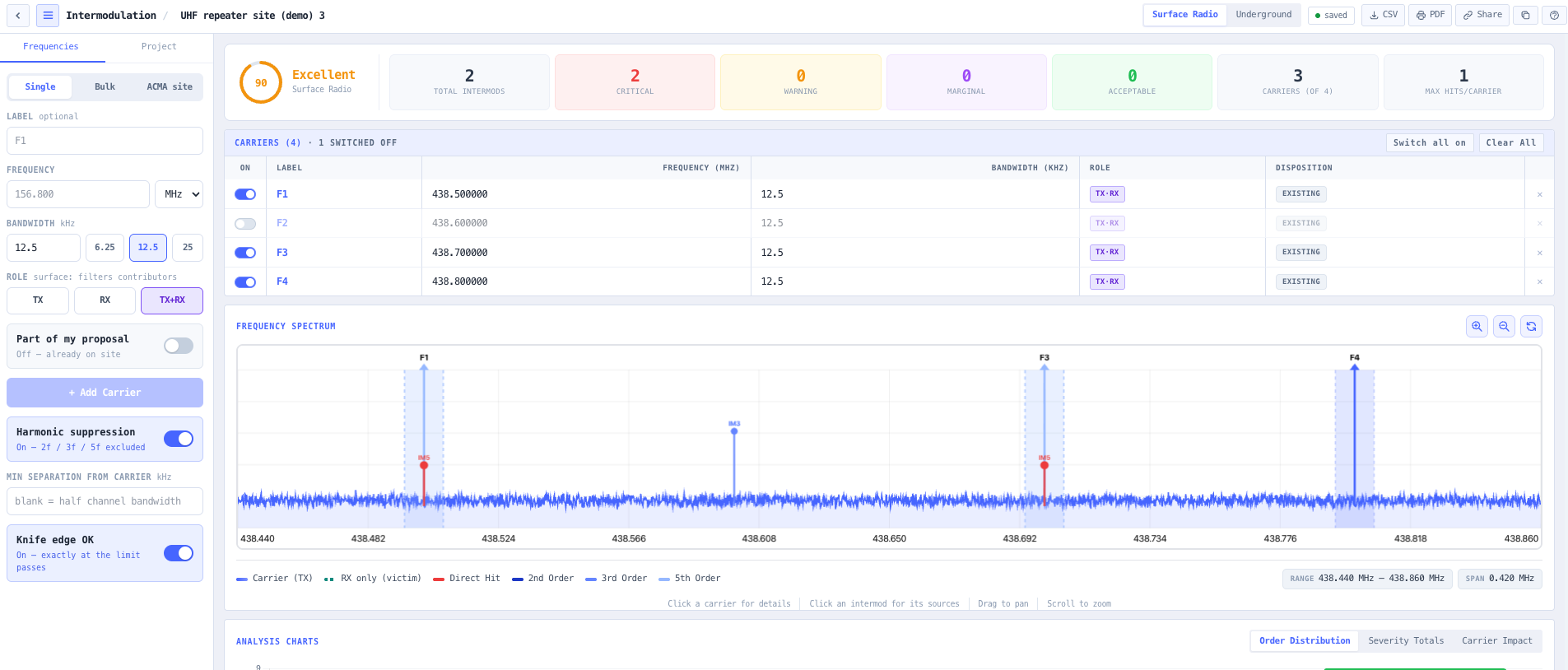
Every plan is automatically scored from poor to excellent based on total intermodulation count, critical spacing violations, and per carrier impact. Each product is graded against the victim carrier’s own channel width: inside half that width is critical, then three widening zones at 12.5, 25 and 50 kHz beyond it. Because the threshold follows the carrier rather than a fixed number, the same tiering works for 6.25 kHz narrowband and for a wide channel. An interactive spectrum view plots carriers and products side by side, and carriers can be typed, uploaded as CSV, or imported from the ACMA register.

Capabilities

ITU aligned intermodulation engine

2nd, 3rd, and 5th order intermodulation products computed using industry standard mathematical models. Underground specific two signal (2F1 minus F2) and three signal (F1 plus F2 minus F3) 3rd order formulas are included to reflect confined environment RF behaviour. Results are categorised by proximity to carrier bandwidth to highlight critical and warning conditions.

Surface and underground modes

Switch between surface radio and underground environments to apply the appropriate analysis model and scoring logic. Underground mode emphasises close frequency carrier interaction and tight bandwidth tolerances common in mining and tunnel communications systems where 3rd order intermodulation dominates.

Real time system scoring

Every frequency plan is automatically scored from poor to excellent based on total intermodulation count, critical spacing violations, and per carrier impact. Maximum hits per carrier are surfaced. Products are classified as critical, warning, or acceptable so the system health read is immediate rather than buried in a long table.

Interactive spectrum visualisation

A built in spectrum viewer plots carrier frequencies alongside calculated 2nd, 3rd, and 5th order products. Zoom, pan, and inspect individual spikes to analyse interference distribution across the band. Frequency span and distribution metrics provide a clear picture of overall spectrum efficiency.

Per carrier impact analysis

Detailed per carrier analysis shows how many intermodulation products affect each channel, identifying high risk frequencies within the system. Clean carriers are flagged. Heavily impacted channels are prioritised for reassignment during coordination exercises so remediation effort is targeted rather than scattered.

Flexible carrier entry

Add carriers one at a time with a label, value, unit, per carrier bandwidth and direction, or upload a whole plan from a CSV template. An exported plan can be edited and re-imported, so a frequency list maintained elsewhere stays the source of truth.

ACMA site import

Search the ACMA register by site ID, site name, licence number or postcode and import the licensed services already on a shared tower as carriers, instead of transcribing a licence schedule by hand. Import everything on the site, or restrict it by band, frequency range, device type or licensee, with band edges taken from the RALI LM 08 coordination bands. The register device type sets the carrier role, so transmit records become intermod contributors and receive records become victims.

Proposal mode: what your change adds to a shared site

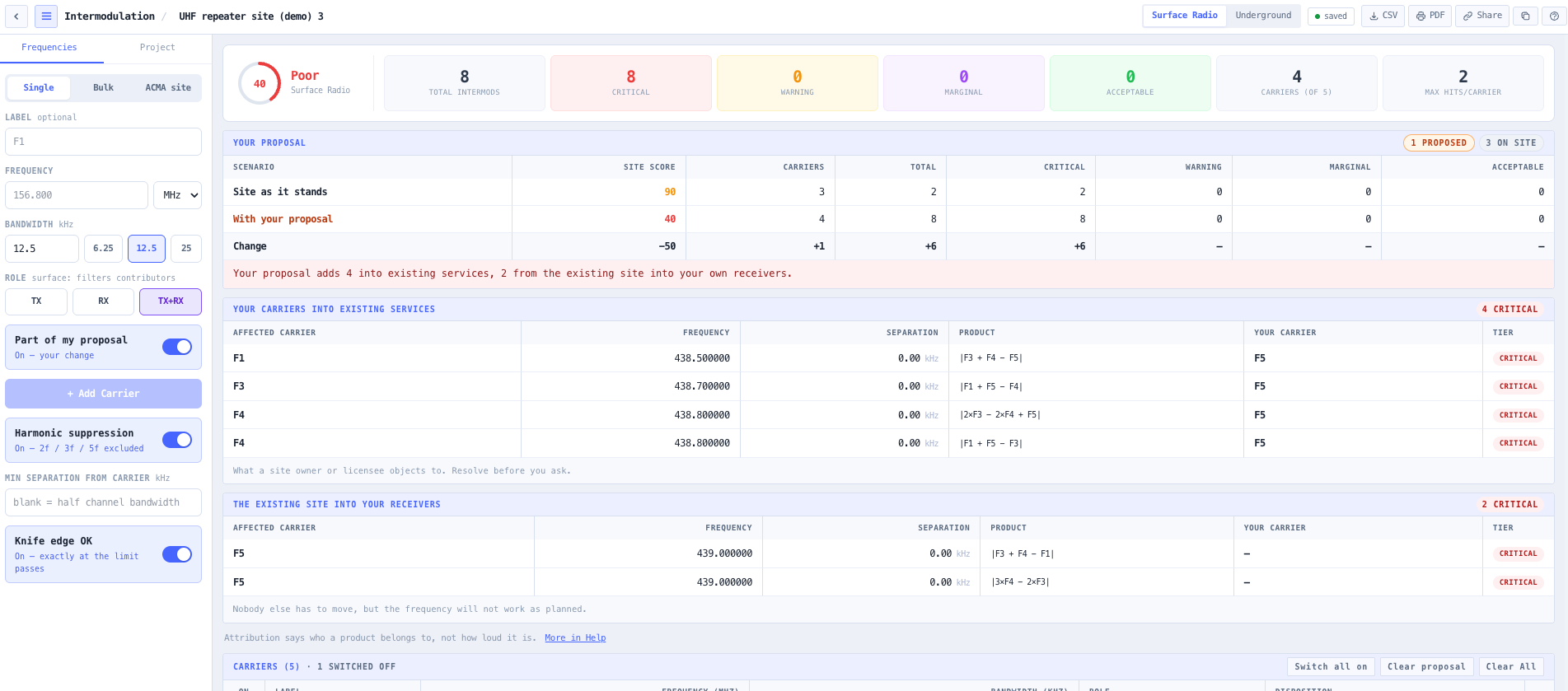
Mark which carriers are already on the tower and which are the change you are proposing, and every intermodulation product is attributed to a party. Products your proposal puts into a receiver already on site are separated from products the existing site puts into a receiver you are adding, because those are the same arithmetic and completely different conversations: one is a negotiation with a licensee who can refuse you, the other is a channel choice nobody else is involved in. Interference within your own plan is listed separately again, since both ends are yours to move. The site is scored before and after your change, the affected licensee is named on every product, and the whole attribution carries into the CSV export and the PDF report.

Every import is previewed and accounted for

Nothing is imported until you have seen it. The preview reports how many register records were selected and itemises every exclusion by cause, estimates the intermod product count before the analysis runs, and flags a carrier set whose span is too wide for the services to share hardware. Each imported carrier keeps its licence number, licensee, site and licensed EIRP, and that trail appears in the CSV export and the PDF report so a licensed service and a proposed one are never mistaken for each other.

Critical spacing detection

Each product is graded against the victim carrier’s own channel width rather than a fixed number: inside half that width is critical, then warning, marginal and acceptable zones at 12.5, 25 and 50 kHz beyond it. Critical hits are surfaced first, so the most damaging interactions are addressed before lower priority ones.

Your carrier list stays in your browser

The intermodulation analysis runs entirely in your browser and your carrier list is never transmitted, which matters when it is operationally sensitive, commercially confidential, or covered by an information security regime that prohibits sending raw spectrum data to third party services. The optional ACMA site import is the one feature that talks to a server, and it sends only what you searched for: the site you asked about goes out, the public register records for that site come back, and your own carriers are not part of either.

Standards & methodology

  • ITU SM.1446. Intermodulation interference reference
  • ITU SM.337. Frequency separation between adjacent transmissions
  • ITU SM.329. Unwanted emissions in the spurious domain
  • ACMA spectrum management framework alignment for Australian deployments

When to use this tool

  • Designing multi channel underground mining radio systems
  • Coordinating VHF marine or port authority frequency plans
  • Validating repeater input and output channel spacing
  • Assessing intermodulation risk before commissioning new transmitters
  • Troubleshooting unexplained interference at shared RF sites
  • Teaching RF coordination and intermodulation fundamentals
  • Auditing amateur radio repeater plans before licence applications
  • Verifying PMR446 and UHF CB shared site arrangements
  • Producing intermodulation evidence for ACMA licence applications
  • Sanity checking a candidate carrier addition to a working network
  • Comparing 2nd, 3rd, and 5th order contribution between candidate plans
  • Demonstrating intermodulation behaviour to stakeholders during a coordination engagement

Is this the right tool for you?

Reach for the Intermodulation Calculator in any of the following situations.

  • You are planning a multi channel underground mining radio system and need a fast intermodulation analysis tuned for confined environment 3rd order dominance.
  • You are coordinating a VHF marine or port authority frequency plan and need to confirm the proposed channels do not generate intermodulation that lands on safety or working channels.
  • You are validating that a repeater input and output channel spacing does not create 2nd or 3rd order products on adjacent assignments.
  • You are about to commission a new transmitter at an existing site and want to confirm the addition will not create intermodulation hits on incumbent channels.
  • You are troubleshooting unexplained interference at a shared RF site and want to rule in or rule out intermodulation as the cause before reaching for replacement hardware.
  • You are an amateur radio operator or club planning a repeater system and need a credible intermodulation analysis before submitting the licence application.
  • You are coordinating a PMR446 or UHF CB shared site arrangement and need a fast carrier impact summary to identify which channels are at risk.
  • You are preparing an ACMA licence application or variation and need documented intermodulation evidence to support the channel choices.
  • You are evaluating a candidate plan against several alternatives and want a system score that lets you compare them quickly rather than reading through long product tables.
  • You are training new RF engineers in intermodulation behaviour and want an interactive spectrum view that shows products appearing and disappearing as carriers change.
  • You are demonstrating intermodulation behaviour to a non technical stakeholder during a coordination engagement and need a visual that makes the problem obvious.
  • You are operating under a security regime that prohibits sending raw spectrum data to third party services and need a calculator that runs entirely in your browser.
  • You need a quick second order product check on a tight pair of carriers before recommending them to a client.
  • You are auditing an inherited plan and want a fast intermodulation read before deciding whether a Frequency Plan Validator and Optimiser pass is justified.

Frequently asked questions

Which intermodulation orders are calculated?

2nd order (sums and differences of carrier pairs), 3rd order including both two signal (2F1 minus F2) and three signal (F1 plus F2 minus F3) products, and 5th order two signal and three signal products. Underground mode emphasises 3rd order dominance because higher orders are heavily attenuated by structure loss in confined environments.

What is the difference between surface and underground modes?

Surface mode evaluates the full 2nd, 3rd, and 5th order set with scoring weights tuned for open air radio deployments. Underground mode focuses on 3rd order dominance and applies tighter bandwidth tolerances to reflect the confined environment behaviour observed in mining, tunnelling, and metro radio installations. Picking the wrong mode produces either false positives (running surface assumptions in a tunnel) or false negatives (running underground assumptions on a surface site).

How is the system score calculated?

The score combines total intermodulation product count, critical spacing violations (products landing inside half a victim carrier’s own channel width), and per carrier impact (maximum hits on a single carrier). The result maps to a poor to excellent band that gives engineers an immediate health read without parsing the full product table.

Where do the carriers come from?

Type them one at a time, upload a plan from a CSV template, or import a site from the ACMA register by site ID, name, licence number or postcode. A register import brings the licensed services on a shared tower in as carriers, with each one keeping its licence number, licensee, site and licensed EIRP, so a coordination study starts from what is actually on the structure rather than from a hand transcribed licence schedule.

Does any frequency data leave my browser?

No. The calculator runs entirely in your browser. No carrier frequencies, bandwidths, or system data are submitted to a server. This matters when the plan is operationally sensitive, commercially confidential, or covered by an information security policy that prohibits sending raw spectrum data to third party services.

How is this different from the Frequency Plan Validator?

The calculator is the right tool for fast multi carrier intermodulation analysis on small to medium plans, with strong educational and demonstration value through the interactive spectrum view, and it is the only one of the two that imports a site from the ACMA register and attributes findings to a party. The Frequency Plan Validator is the heavier audit tool for production radio plans, with bandwidth aware proximity zones, a full hit table with formulae and contributors, source and victim impact analysis, and CSV export. Use the calculator for quick analysis and teaching. Use the validator for full audits and report deliverables.

Can I bring my own bandwidth values?

Yes. Bandwidth is configurable per carrier so mixed plans (narrowband VHF alongside wideband UHF, for example) get a fair analysis rather than every channel being treated as the same width.