RF Utilities

dB Conversion Calculator

Power, ratio, antenna gain, and decibel mathematics in a single precision RF utility. Convert between dBm, dBW, mW, W, microwatt, kW, and dBuV instantly.

Overview

Decibels are the working language of RF engineering. Transmit power is in dBm. Antenna gain is in dBi. Path loss is in dB. Receiver sensitivity is in dBm. Link budgets add and subtract these values directly because the underlying mathematics is logarithmic. Mistakes happen at the conversion boundaries, and they happen often. A 30 dBm transmitter is 1 watt, not 30 watts. A 30 dBW transmitter is 1 kilowatt. A 6 dB gain is a factor of four in power, not six. Engineers who do this work every day still want a precision tool to remove the conversion as a source of error.

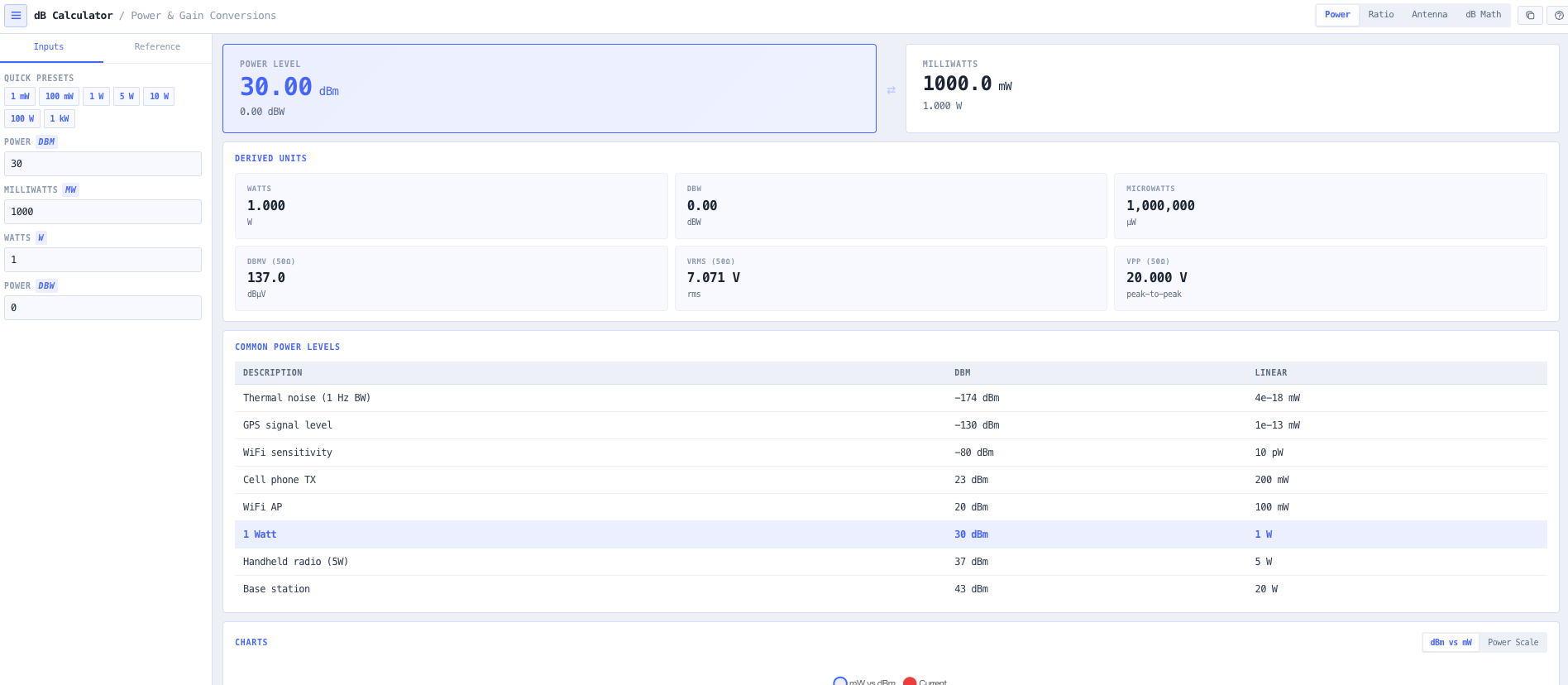
The noIM₃ dB Conversion Calculator is the precision utility for that work. It performs instant bidirectional conversion between dBm, dBW, milliwatts, watts, microwatts, kilowatts, and dBuV referenced to 50 ohm. Conversions follow the standard logarithmic relationships (mW equals 10 to the power of dBm divided by 10, dBm equals dBW plus 30, dBuV equals dBm plus 107 in 50 ohm) so output is exact rather than rounded. Multiple unit families are surfaced together so you do not have to chain conversions through an intermediate value.

Beyond raw conversion, the calculator handles the dB arithmetic that drives every link budget. Add a transmitter output to an antenna gain. Subtract feeder loss. Add receive antenna gain. Subtract free space path loss. Compare to receiver sensitivity. The arithmetic is the link budget. Built in antenna gain conversions, voltage level conversions for dBuV at 50 ohm, and reference levels for thermal noise (around minus 174 dBm per Hz), GPS signal levels, WiFi sensitivity thresholds, handheld radio transmit power, and base station outputs let you orient any signal level against the values you actually meet in service.

Capabilities

Comprehensive power conversions

Convert seamlessly between dBm, dBW, milliwatts, watts, microwatts, and kilowatts. Standard logarithmic relationships apply. mW equals 10 to the power of dBm divided by 10. dBm equals dBW plus 30. Output updates instantly across all unit families to support transmitter validation, compliance checks, and link analysis.

dBuV voltage level conversions

Bidirectional dBuV conversion referenced to 50 ohm so spectrum analyser and field strength meter readings can be moved into the dBm and watt domain without an intermediate step. Useful when receiver sensitivity is quoted in dBuV but the rest of the link budget is in dBm.

Real time decibel arithmetic

Perform dB addition, subtraction, and ratio conversions in a single workspace. Ideal for link budget development, feeder loss estimation, amplifier gain staging, and system performance modelling. Operations happen in dB throughout, so you do not lose precision through repeated unit conversion.

Antenna gain and ratio conversions

Convert between linear ratios and dB at any time. 3 dB returns 2x. 10 dB returns 10x. 20 dB returns 100x. Useful for sanity checking datasheet values, validating amplifier gain, and translating manufacturer specs between gain in dB and a linear power ratio.

Real world RF reference levels

Built in reference points orient any number against signals you actually meet. Thermal noise floor at minus 174 dBm per Hz. GPS signal level at the antenna. WiFi sensitivity thresholds. UHF handheld transmit power. Cellular base station output. These benchmarks support rapid situational assessment during design and troubleshooting.

Logarithmic power scale visualisation

An interactive scale shows the exponential relationship between linear power and decibels. Useful for building intuition when analysing wide dynamic range systems, where a transmitter at 50 dBm and a receiver at minus 100 dBm differ by a factor of 100,000,000,000,000 in linear power.

Browser only computation

Runs entirely in your browser. No power levels, link budgets, or design data are submitted to a server. Useful for commercially confidential work, classified projects, or any environment where information security policy prohibits sending engineering data to third party services.

Standards & methodology

  • IEEE 145 standard definitions of terms for antennas
  • ITU SM.1268 measurement of unwanted emissions in dB referenced units
  • IEC 60050 international electrotechnical vocabulary on the decibel
  • Standard 50 ohm impedance reference for dBuV calculations

When to use this tool

  • Calculating transmitter output power in dBm or watts during design or commissioning
  • Performing RF link budget gain and loss analysis
  • Converting laboratory measurements between dBuV and dBm
  • Validating antenna gain and feeder attenuation against datasheet values
  • Teaching logarithmic power concepts in RF engineering courses
  • Troubleshooting receiver sensitivity and noise floor issues in operational systems
  • Translating manufacturer specifications between linear and dB representation
  • Sanity checking compliance limits expressed in dBm against measured equipment outputs
  • Producing link budget tables for licence applications and engineering reports
  • Comparing different transmitter and amplifier options on a like for like dB basis
  • Converting between dBuV per metre field strength and equivalent received power
  • Establishing reference levels for spectrum analyser and field strength meter measurements

Is this the right tool for you?

Reach for the dB Conversion Calculator in any of the following situations.

  • You are computing a link budget and need to add transmit power to antenna gain, subtract feeder loss, subtract path loss, and compare to receiver sensitivity, all in consistent dB units.
  • You are commissioning a transmitter and need to confirm the actual output in dBm matches the design value in watts.
  • You have a receiver sensitivity quoted in dBuV (50 ohm) and need to convert it to dBm before plugging it into a link budget that is otherwise in dBm.
  • You are reading an antenna or amplifier datasheet that quotes gain in dB and want to confirm what that means as a linear power ratio.
  • You are troubleshooting an underperforming receiver and need to compare measured noise floor against the thermal limit at minus 174 dBm per Hz.
  • You are validating a transmitter output power against an ACMA EIRP limit expressed in watts and need to convert your measured dBm value to watts to confirm compliance.
  • You are translating spectrum analyser readings in dBuV to received power in dBm for inclusion in a measurement report.
  • You are training new RF engineers and want a teaching tool that exposes the logarithmic relationship between dBm and milliwatts visually.
  • You are converting compliance limits between different unit families (dBm, dBW, mW, W) for a regulator submission or customer report.
  • You are an amateur radio operator working with handheld and base station power levels and want a fast conversion between watts and dBm without doing logs in your head.
  • You are sanity checking a vendor proposed gain stage chain and need to confirm the cumulative dB matches the linear power ratio they have claimed.
  • You are working on a propagation calculation that returned path loss in dB and need to apply it to a transmit power in watts to get a received power in dBm.
  • You are operating under a security regime that prohibits sending design data to third party services and need a calculator that runs entirely in your browser.
  • You are establishing reference levels for a measurement campaign and want a single workspace that exposes thermal noise, GPS, WiFi, and base station benchmarks.

Frequently asked questions

What is the difference between dBm and dBW?

Both are decibel power units, just with different reference levels. dBm is referenced to 1 milliwatt. dBW is referenced to 1 watt. They differ by exactly 30 dB because 1 watt equals 1000 milliwatts and 10 log of 1000 equals 30. So 30 dBm equals 0 dBW equals 1 watt. The calculator surfaces both simultaneously so the conversion is a read across rather than a calculation.

How do I convert dBm to watts?

Watts equals 10 to the power of (dBm minus 30) divided by 10. So 30 dBm equals 1 watt. 40 dBm equals 10 watts. 50 dBm equals 100 watts. 0 dBm equals 1 milliwatt. The calculator does this exactly rather than rounding, so the output preserves enough significant figures for engineering documentation.

Why do RF engineers use decibels instead of linear units?

Two reasons. First, RF systems span enormous dynamic range. Transmit power and receive sensitivity can differ by 14 orders of magnitude in linear power. Decibels compress that into a workable scale. Second, the link budget calculation is multiplication of linear power ratios, which becomes addition once converted to decibels. Adding 50 dBm transmit power, 17 dBi antenna gain, minus 3 dB feeder loss, minus 130 dB path loss, and 17 dBi receive gain to get minus 49 dBm received power is much faster than the equivalent linear arithmetic.

What is dBuV and when do I need it?

dBuV is decibels referenced to 1 microvolt. It is commonly used for receiver sensitivity, field strength, and spectrum analyser measurements. In a 50 ohm system, dBuV equals dBm plus 107. The calculator does this conversion automatically so you can move between the receiver datasheet vocabulary (dBuV) and the link budget vocabulary (dBm) without an intermediate spreadsheet.

What is the thermal noise reference?

The thermal noise floor at standard temperature is approximately minus 174 dBm per Hz. For a given receiver bandwidth in Hz, the noise floor in dBm equals minus 174 plus 10 log of the bandwidth. The calculator surfaces this reference so you can quickly compare a measured noise level against the theoretical floor and see whether the receiver is genuinely thermal limited or affected by external interference.

Does any data leave my browser?

No. The calculator runs entirely in your browser. No power levels, link budgets, or design data are submitted to a server. Useful for commercially confidential work, classified projects, or environments where information security policy prohibits sending engineering data to third party services.

Can I do dB arithmetic directly?

Yes. Add and subtract dB values directly within the workspace, which is how every link budget is built. The arithmetic stays in the dB domain so you do not lose precision through repeated unit conversion. Ratio to dB and dB to ratio conversions sit alongside the arithmetic for sanity checking against linear values.