Engineering Delivery

Cable Schedule Generator

Build a deliverable cable schedule for any comms project in a fast inline grid — type straight into cells or paste from Excel — with fully customisable columns saved as per-client templates and a cable-number engine that auto-generates tags from the cable type and equipment, then export to CSV, clipboard or JSON.

Overview

A cable schedule is the register a communications installation runs on — the single source of truth for what cable goes where, how it is terminated and whether it has been installed and tested. On most projects it lives in a hand-kept spreadsheet, and a tool only earns its place if it is genuinely faster than that spreadsheet and bends to each client’s standard instead of forcing a generic one. The Cable Schedule Generator is built around exactly those two things.

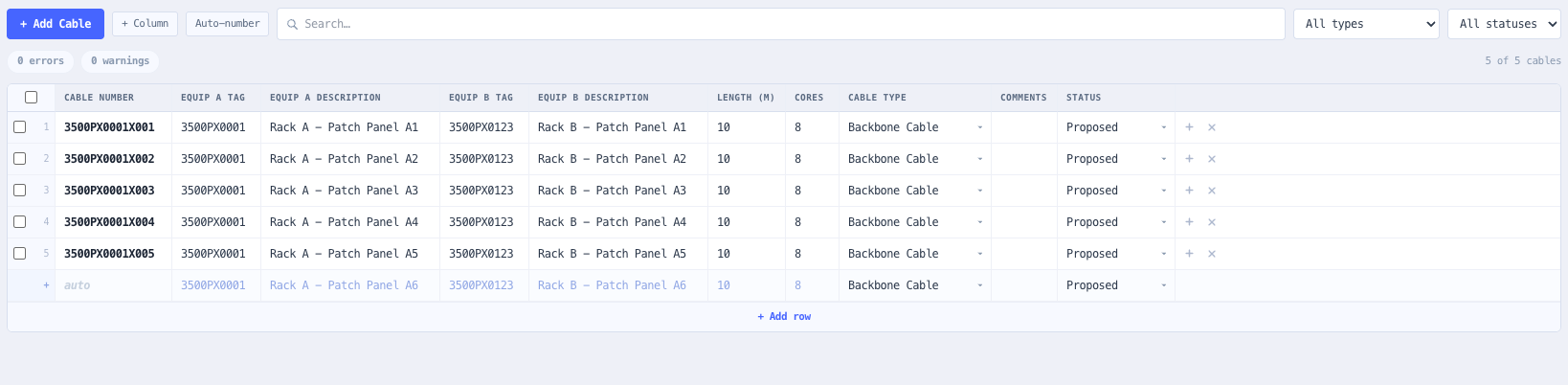
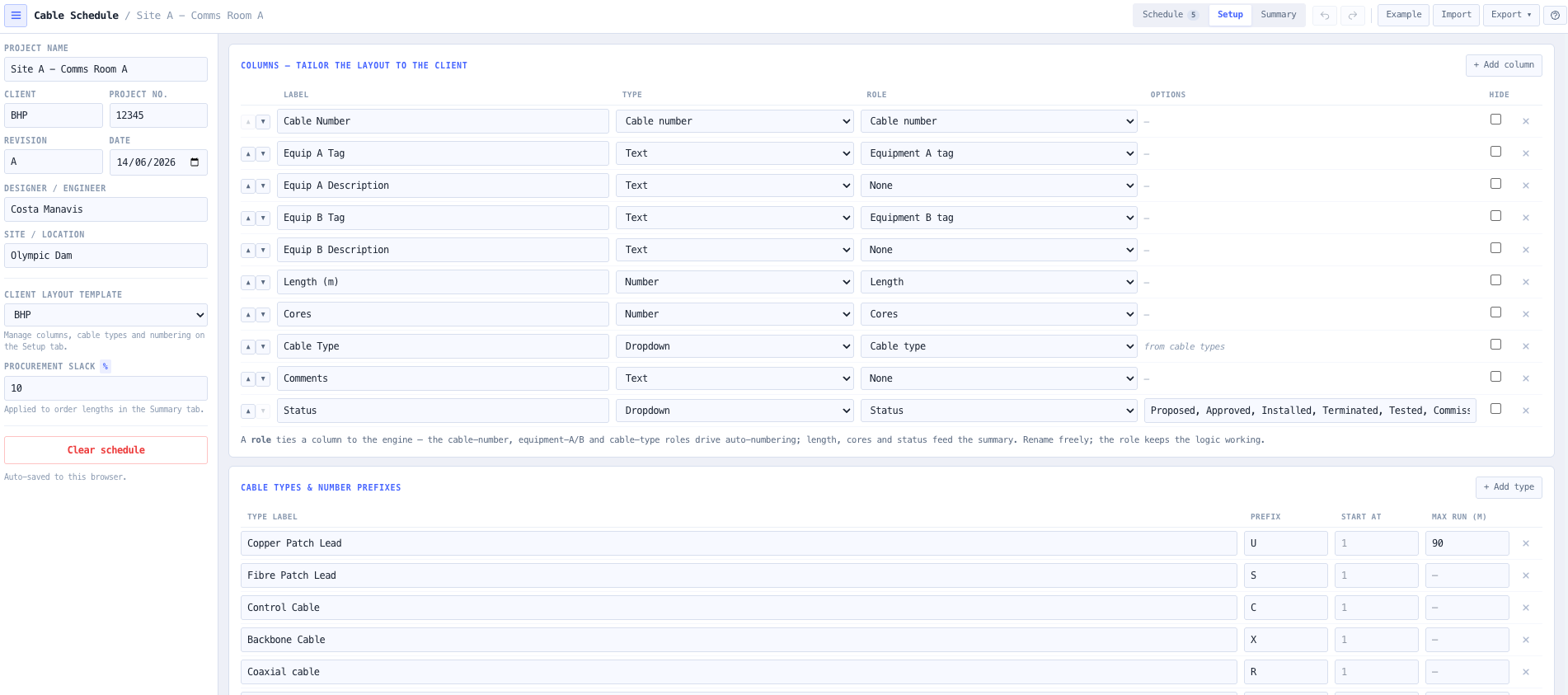
It is a grid, not a form. You type straight into a spreadsheet-style table — Tab moves across, Enter moves down and adds a row at the bottom, and a block copied from Excel pastes straight in across the right columns. There is no pop-up between you and the data. The layout is defined per client: add, rename, reorder and hide columns and set each column’s type, starting from the standard set — Cable Number, Equipment A tag and description, Equipment B tag and description, length, cores, cable type, comments and status — and save the result as a reusable client template.

The automation that makes it quicker than a blank sheet is the cable-number engine. Each cable type carries a prefix (U structured, S fibre, C control, X backbone, all editable), and the number is built from a per-client pattern of tokens — {type}, {equipA}, {equipB} and a padded {seq}. So {type}{seq:3} yields U001, U002 counting per type, while {equipA}{seq:4} folds the A-end equipment tag into the number to give 3500PX0001. Pick the cable type on a row and the number appears; override it by typing, or auto-number the blanks. Validation flags duplicate numbers, missing equipment ends and over-length runs; the summary turns the schedule into a by-type procurement estimate; and it all exports to CSV, clipboard or JSON. It is a documentation and scheduling tool — it does not size conductors or compute loss.

Capabilities

A grid, not a form

The schedule is an inline editable grid. Tab moves across cells, Enter moves down and adds a row when you reach the bottom, and a block copied from Excel pastes straight in, creating rows as needed. No pop-up stands between the engineer and the data, so building and editing a schedule is faster than maintaining it by hand.

Columns tailored to each client

Every column is customisable — add, rename, reorder and hide them, and set each one’s type (text, number, dropdown, or the auto cable-number). The standard layout ships ready to use. Columns carry an optional role that ties them to the numbering, validation and summary logic, so they can be renamed to a client’s wording without breaking the automation.

A cable-number engine, defined per client

Cable numbers are built from a per-client pattern of tokens — {type} for the cable-type prefix, {equipA} and {equipB} for the equipment tags, and {seq:n} for a zero-padded sequence. {type}{seq:3} gives U001; {equipA}{seq:4} gives 3500PX0001. Each type has its own editable prefix, and the sequence counts per type, against one running counter, or per equipment-A tag.

Numbers that build themselves

Pick the cable type on a row and its number is generated from the client’s pattern. Override any number by typing over it, or run Auto-number to fill every blank at once. The sequence counts per cable type by default — U001, U002… and S001, S002… run independently — matching the convention most clients use.

Reusable client templates

Save a column layout, cable-type list and numbering format as a named template and reapply it to the next project for that client. Applying a template carries existing cable data across where the columns match (by role, then by label), so a schedule can be re-skinned to a client standard without re-keying it.

Standards-aware validation

Validation runs continuously: duplicate cable numbers are errors, missing Equipment A or B are warnings, and a run that exceeds its cable type’s maximum length is flagged — the structured type defaults to the 90 m balanced twisted-pair permanent-link limit (ANSI/TIA-568, ISO/IEC 11801). A health strip surfaces the counts and the list links straight to the offending row.

Summary, procurement estimate and export

The summary totals the cable count and installed route length, applies a configurable slack to give an order length, and rolls the schedule up by cable type (a procurement estimate) and by install status. Export to CSV (project-headed, formula-injection safe), copy to the clipboard for an Excel template, or save the whole project to JSON; everything auto-saves to the browser.

Honest, bounded scope

This is a documentation and scheduling tool. It builds, validates and exports the cable schedule; it does not size conductors, compute voltage drop, or calculate optical or RF loss. The platform carries dedicated calculators for those questions that the schedule sits alongside.

Standards & methodology

  • ANSI/TIA-568 and ISO/IEC 11801 — 90 m permanent link / 100 m channel for balanced twisted-pair horizontal cabling
  • Configurable per-type run-length limits for the validation check
  • Client-defined cable-numbering conventions (type prefixes and tag composition)
  • CSV formula-injection neutralisation on export

When to use this tool

  • Producing the cable schedule deliverable for a comms or ICT fit-out, faster than a hand-kept spreadsheet
  • Tailoring the column layout to each client’s cable-schedule standard
  • Auto-generating cable numbers from the cable type and equipment to a client-defined format
  • Folding the equipment-A tag into the cable number (e.g. 3500PX0001) where a client requires it
  • Pasting an existing schedule in from Excel and tidying it up in the grid
  • Catching duplicate cable numbers and runs that exceed the structured-cabling length limit
  • Estimating cable drum order quantities by type with a procurement slack
  • Tracking install progress by status from proposed through tested to commissioned
  • Saving a client layout as a template and reusing it across projects
  • Exporting a clean CSV cable schedule, or copying it straight into an Excel template

Is this the right tool for you?

Reach for the Cable Schedule Generator in any of the following situations.

  • You want a cable schedule that is genuinely faster than the Excel sheet you keep by hand — type straight in, paste a block, no pop-ups.
  • Your client has its own cable-schedule layout and you need the columns to match theirs, saved so you can reuse it on the next job.
  • Your client derives cable numbers from the equipment tag (3500PX0001) and you need the number to build itself from the A-end tag plus a sequence.
  • Your client numbers by type — U for structured, S for fibre, C for control, X for backbone — each counting independently.
  • You want to be warned before installation that a run is over the 90 m permanent-link limit, and that no two cables share a number.
  • You need a cable-drum order estimate by type with a sensible slack added to the installed lengths.

Frequently asked questions

How is this faster than a spreadsheet?

It is an inline grid you type straight into — Tab moves across, Enter moves down and adds a new row at the bottom, and you can paste a block straight from Excel. There is no pop-up per cable. On top of that, cable numbers generate themselves from the cable type and your client’s numbering pattern, so the most repetitive part of keeping the sheet is automated.

Can I match my client’s exact cable-schedule layout?

Yes. On the Setup tab you add, rename, reorder and hide columns and set each column’s type. The standard set is just the starting point. Save the finished layout — together with the cable-type list and numbering format — as a client template and reapply it to the next project for that client.

How does the cable numbering work?

You define a pattern from tokens: {type} for the cable-type prefix, {equipA} and {equipB} for the equipment tags, and {seq:n} for a zero-padded sequence. {type}{seq:3} gives U001; {equipA}{seq:4} gives 3500PX0001. Each cable type carries its own editable prefix (U structured, S fibre, C control, X backbone), and you choose whether the sequence resets per type, runs continuously, or resets per equipment-A tag. Picking the type on a row generates the number; you can always type over it.

What does the validation check?

It flags duplicate cable numbers as errors, missing Equipment A or B as warnings, and any run that exceeds its cable type’s maximum length — the structured type defaults to the 90 m balanced twisted-pair permanent-link limit (ANSI/TIA-568, ISO/IEC 11801). The counts appear live on the schedule, and each issue links straight to the offending row.

How do I get the schedule into my document set?

Export to CSV for a standalone deliverable — it is headed with the project details and neutralised against spreadsheet formula injection — or copy the schedule to the clipboard as tab-separated text and paste it straight into an existing Excel template. You can also save the whole project to JSON to reload later, and everything auto-saves to your browser.

Does it size cables or calculate loss?

No. This is a documentation and scheduling tool — it builds, validates and exports the cable schedule. It does not size conductors, compute voltage drop, or calculate optical or RF loss. The platform carries dedicated calculators for those questions.