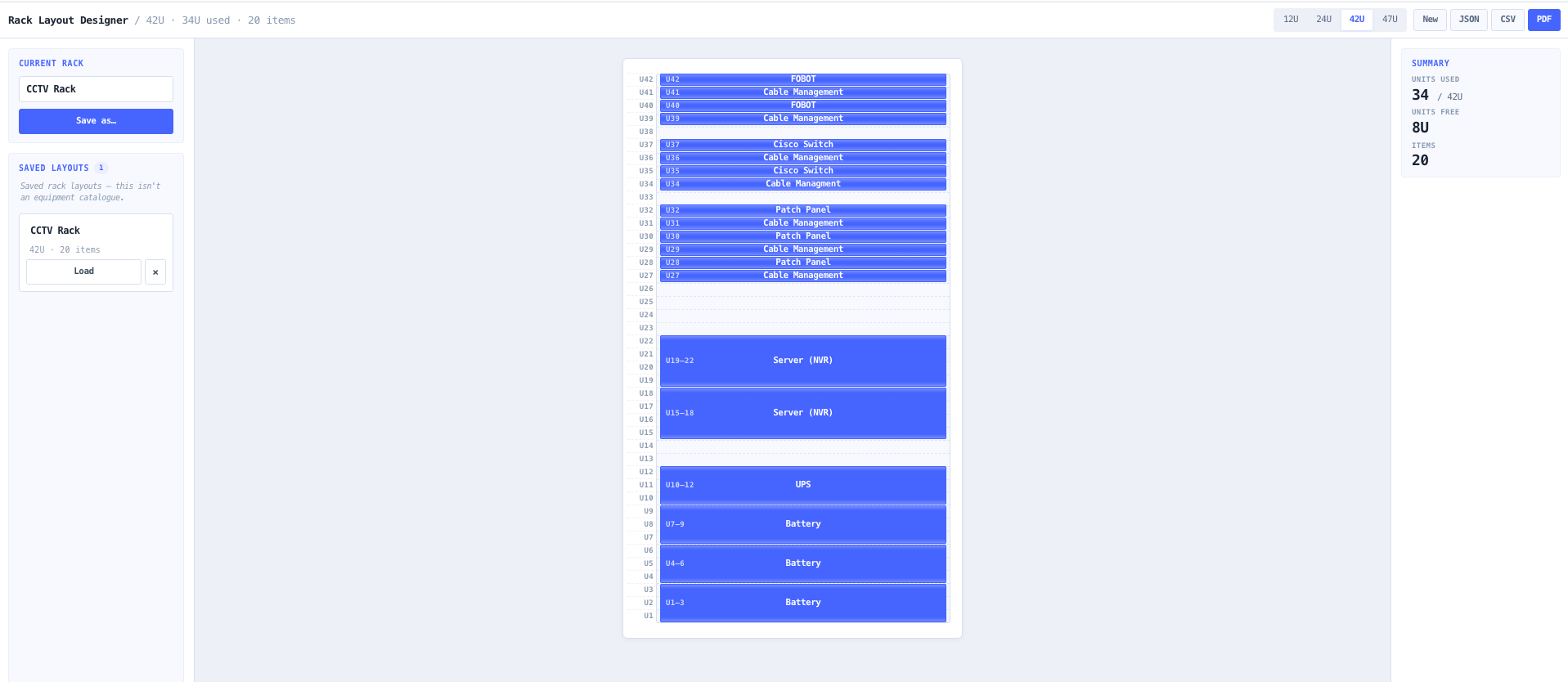
Most rack designs start with an engineer who already knows what is going in the cabinet — a specific switch, a UPS, an inline amplifier, a patch panel, a PDU, a few blank fillers. The question is not what the equipment weighs or draws. The question is how it lays out, how much U is left, and what to hand the installer or the customer.
The noIM₃ Rack Layout Designer is built for exactly that workflow. Pick a rack height from the four canonical presets (12U, 24U, 42U, 47U), drag a U range in the elevation, type a part number or a label, hit enter, and drag the next one. Move, resize, duplicate, or delete any block. Cmd/Ctrl-Z undoes the last action. Add a free-text note to any block when the label alone is not enough (port assignments, "rear PSU on PDU A", "spare 1U for future").
Export a single-page A4 PDF layout, a CSV of the rack contents, and a JSON snapshot to save and resume later. The design and your saved layouts auto-persist in localStorage so closing the tab does not lose the work. The tool is deliberately narrow: no equipment catalogue, no weight or power roll-up, no thermal modelling — just a fast way to block out the cabinet and produce a clean handoff drawing.