Frequency Coordination

Frequency Plan Optimiser

Minimise intermodulation in existing radio plans through precision channel shifts. No hardware changes, no full redesign, just a cleaner plan within your installed constraints.

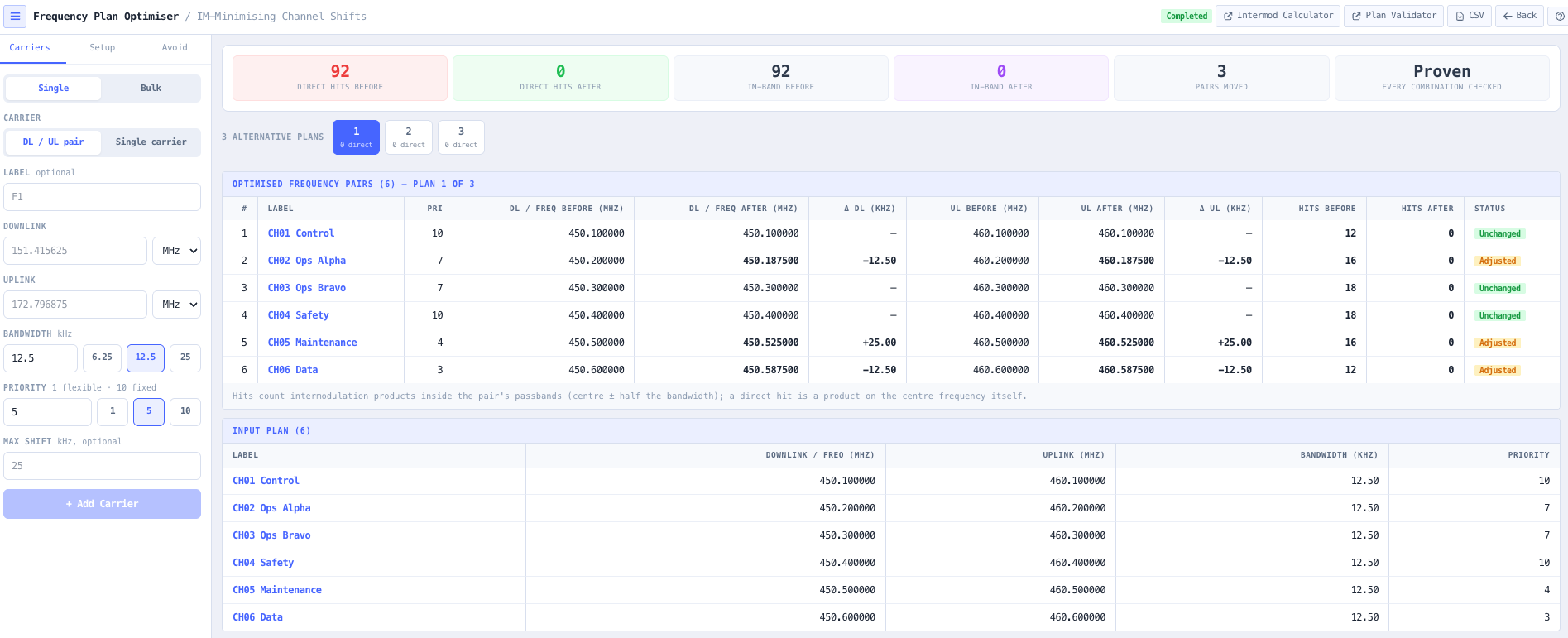
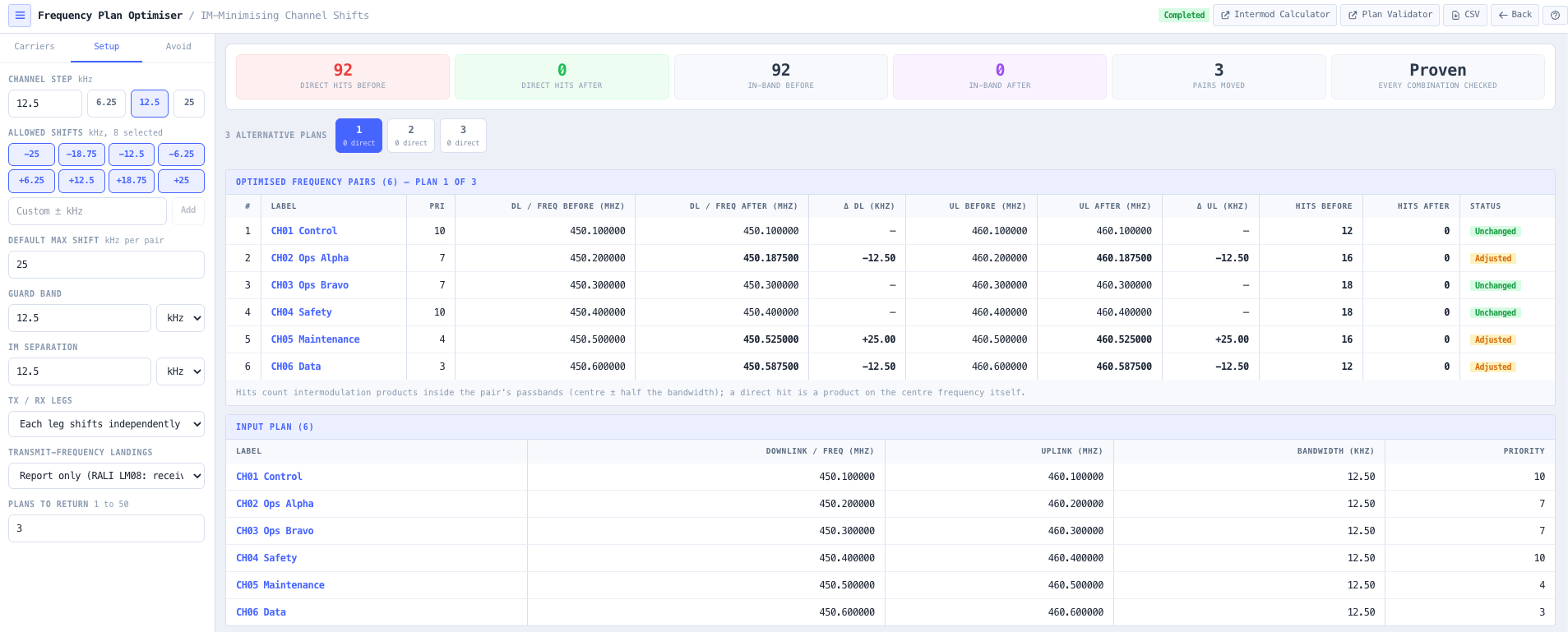
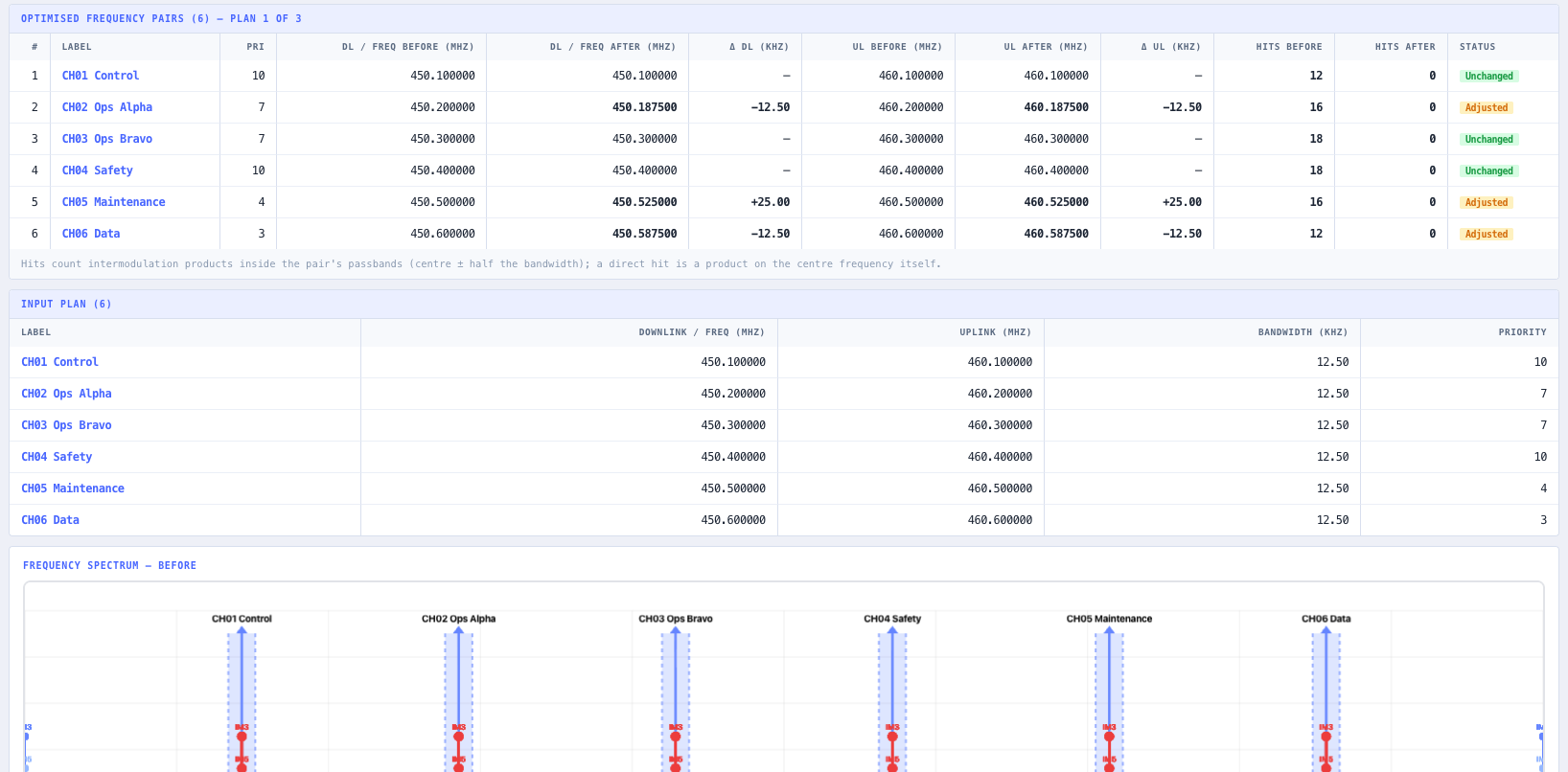
Frequency Plan Optimiser interface showing a before and after comparison table, intermodulation reduction metrics, and side by side spectrum views.

Overview

Most radio sites do not start dirty. They grow dirty. A network is deployed clean, then a contractor adds two channels, an operations team adds a data channel, an emergency channel is squeezed in for a one off project, and over the course of years the plan accumulates intermodulation products that mask weak signals, shorten range, and trigger intermittent interference that nobody can quite reproduce on demand. By the time the operator notices, the radios are already on the wall, the licences are already issued, and a full redesign would mean recoordinating the whole site.

The noIM₃ Frequency Plan Optimiser solves the problem differently. Instead of redesigning from scratch, the engine takes the existing frequency plan and applies small precision shifts to each channel within hardware tunable steps (typically 6.25, 12.5, or 25 kHz) to find the combination that minimises total intermodulation while preserving channel assignments, splits, and operational intent. The radios stay where they are. The licence holder keeps the same channel set. The technicians get a CSV reprogramming table and a single field visit to retune. The site comes back online materially cleaner.

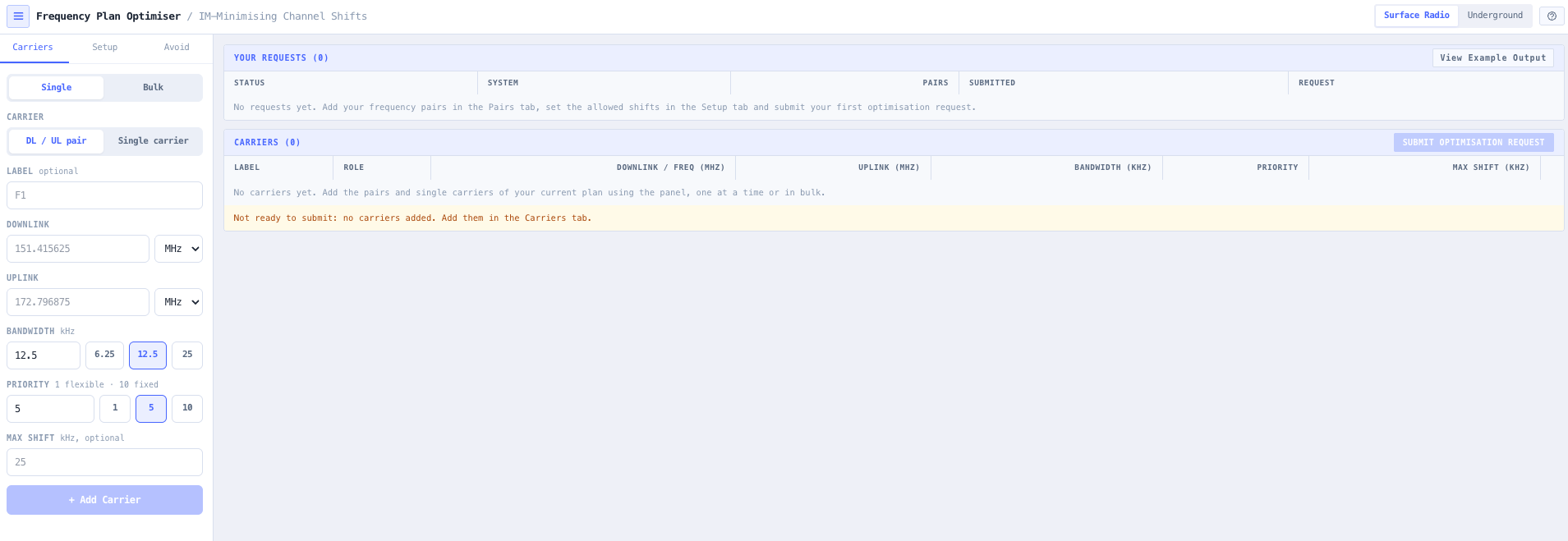
Inputs include the existing frequency plan, allowed shift steps, per channel maximum shift limits, guard band requirements, intermodulation separation constraints, a list of channels to avoid, and optional priority weighting so the most critical channels (safety, dispatch, emergency) are constrained to the smallest shifts while less critical channels absorb larger adjustments. Output is a full before and after comparison table, headline reduction metrics, side by side spectrum views, and an exportable CSV ready to hand to the radio technician.

Capabilities

Constrained shift optimisation

Define allowed shift steps (for example 6.25, 12.5, or 25 kHz) and a per channel maximum shift limit. The engine searches shift combinations across all channels simultaneously, scoring each candidate plan against total intermodulation product count, critical hit frequency, and average separation. Hardware constraints are respected at search time, not as an afterthought filter.

Priority weighting per channel

Each frequency pair gets a priority from 1 to 10. High priority channels (safety, control, emergency) are constrained to zero or minimal shift, so the optimiser will not move them unless absolutely necessary. Lower priority channels (operations, maintenance, data) absorb the larger adjustments. Per channel maximum shift limits can also be set in addition to the global default.

Before and after comparison table

The primary output is a per channel comparison showing original transmit and receive frequencies, optimised transmit and receive frequencies, the shift delta in kHz, and the intermodulation product count before and after. Changed channels are highlighted. Unchanged channels confirm which pairs were already optimally placed.

Side by side spectrum analysis

Two spectrum analyser views render side by side, before and after, so you can see exactly how channel positions move and how intermodulation products shift relative to active carriers. The before view shows products clustering on or near active channels. The after view shows those products pushed into guard band or inactive spectrum.

Headline reduction metrics

Four metrics are surfaced at the top of every result: total intermodulation products before and after with percentage reduction, critical hits eliminated (products that fell within one channel step of an active channel), average spacing improvement in kHz, and worst case intermodulation level in dBc before and after. These are the headline numbers for a client report or internal justification.

Surface and underground modes

Surface mode evaluates 2nd, 3rd, and 5th order products typical of open air systems. Underground mode focuses on 3rd order dominance, which reflects the confined environment behaviour observed in mining and tunnelling installations where higher orders are heavily attenuated by structure loss.

CSV reprogramming export

Export the optimised plan as a CSV reprogramming table that maps directly to your radio fleet. The CSV contains the original frequency, the new frequency, and the delta for each channel, ready to hand to a radio technician for a single coordinated retune visit.

Avoid list and guard band enforcement

Channels to avoid (incumbent licences, broadcast bands, exclusion zones) and guard band requirements are enforced at search time. The optimiser will never propose a shift that violates an exclusion or breaches a guard band, so the output is deployable as is, not subject to a post hoc compliance scrub.

Standards & methodology

  • ITU SM.1446. Intermodulation interference reference
  • ITU SM.337. Frequency separation between adjacent transmissions
  • ITU SM.329. Unwanted emissions in the spurious domain
  • ACMA spectrum management framework alignment for Australian deployments

When to use this tool

  • Reducing intermodulation on a mine site with a large installed base of UHF repeaters
  • Cleaning up a trunked radio system that has grown beyond its original frequency plan
  • Preparing a reprogramming schedule for a planned radio maintenance shutdown
  • Quantifying intermodulation improvement for a client report before committing to the work
  • Optimising underground radio plans where 3rd order intermodulation dominates
  • Validating that a proposed channel addition does not worsen existing intermodulation
  • Presenting before and after spectrum views to justify a frequency coordination engagement
  • Generating a CSV reprogramming table for radio technicians and field crews
  • Cleaning up emergency services radio plans that have absorbed channel additions over time
  • Resolving intermittent in band interference complaints on operational networks
  • Producing audit grade intermodulation improvement evidence for ACMA compliance reviews
  • Supporting fleetwide channel rationalisation programs without forcing a full redesign

Is this the right tool for you?

Reach for the Frequency Plan Optimiser in any of the following situations.

  • You are responsible for a mine, tunnel, or industrial site with a UHF repeater network that has grown over time and now suffers from intermittent intermodulation that nobody can fully reproduce.
  • You operate a trunked radio system that started clean and has accumulated channels over years, and you want to clean up the plan without recoordinating the entire site.
  • You are scheduling a radio maintenance shutdown and want a single CSV reprogramming table that the technicians can apply during the visit, with measurable improvement when the network comes back up.
  • You are a consulting RF engineer pitching a frequency coordination engagement to a client and need before and after spectrum views and headline reduction metrics for the proposal.
  • You are running an underground radio network and want a plan optimisation that focuses on 3rd order intermodulation dominance rather than the surface system assumptions baked into generic tools.
  • You are about to add new channels to an existing radio plan and want to confirm that the addition will not worsen intermodulation across the rest of the channel set.
  • You are receiving complaints about intermittent in band interference, audio breakup, or shortened range, and you want to know whether the existing plan is the cause before reaching for an antenna or radio replacement.
  • You are responsible for an emergency services or safety critical radio plan and need an optimisation that constrains your priority channels to zero shift while still reducing intermodulation across the rest of the plan.
  • You are a contractor handed an inherited plan with no documentation and need a defensible analysis of how clean it is before you take operational responsibility for the network.
  • You are preparing an ACMA compliance review and need traceable engineering output showing measured intermodulation reduction against the original plan.
  • You are running a fleetwide channel rationalisation program across multiple sites and need a repeatable workflow that produces site by site reprogramming tables.
  • You are evaluating whether a proposed shift step (for example moving from 12.5 to 6.25 kHz tuning) actually delivers measurable intermodulation improvement against your specific plan.
  • You are training new RF engineers in frequency coordination and want a teaching environment that shows the impact of small channel shifts on the overall intermodulation picture.
  • You are validating a vendor proposed channel reprogramming list and want an independent second opinion on whether the proposed plan actually reduces intermodulation or merely shuffles it.

Frequently asked questions

How is this different from the Frequency Coordination Tool?

The Frequency Coordination Tool selects fresh frequency pairs from scratch, which is the right choice for a greenfield deployment. The Frequency Plan Optimiser starts from an existing plan and applies small precision shifts within hardware tunable steps to clean it up without forcing a redesign. Use coordination for new networks. Use the optimiser when the radios are already on the wall.

What shift steps are supported?

Configurable. Typical inputs are 6.25, 12.5, or 25 kHz, matching the tuning resolution of common UHF and VHF radios. You can also enter custom shift steps. The optimiser will only propose shifts that are achievable on your installed hardware.

How does priority weighting work?

Each frequency pair gets a priority from 1 to 10. High priority (closer to 10) means the optimiser is constrained to zero or minimal shift on that channel. Lower priority channels absorb the larger adjustments. The intent is that safety, dispatch, and emergency channels stay put while operations, maintenance, and data channels do most of the moving.

Can I see how much improvement to expect?

Yes. Four headline metrics are reported at the top of every result. Total intermodulation product count before and after with percentage reduction, critical hits eliminated, average spacing improvement in kHz, and worst case intermodulation level in dBc before and after. Together they give you the numbers you need for a client report or an internal justification.

Does it support underground systems?

Yes. Underground mode focuses on 3rd order intermodulation dominance, which reflects the confined environment behaviour observed in mining and tunnelling installations where higher order products are heavily attenuated by structure loss. This avoids the false positives that a full surface mode analysis would produce in tunnels and stopes.

What does the CSV export look like?

The CSV contains one row per channel, with the original transmit and receive frequencies, the optimised transmit and receive frequencies, and the shift delta in kHz for each. It is structured so a radio technician can program the new values directly into the fleet without further interpretation.

Can I exclude specific frequencies or ranges?

Yes. The avoid list accepts individual frequencies and ranges. Incumbent licences, broadcast bands, exclusion zones, and any channel you simply do not want the optimiser to consider can be added. Exclusions are enforced at search time, so the output is always deployable as is.