RF Utilities

Frequency and Wavelength Calculator

Bidirectional RF converter, antenna design helper, and electromagnetic spectrum explorer in one tool. Convert f to lambda, lambda to f, and immediately get half wave, quarter wave, and 5/8 wave element lengths.

Free forever on a Standard account. No credit card.

Overview

The relationship between frequency and wavelength is the most fundamental equation in radio engineering. Lambda equals c divided by f. Yet most engineers still juggle unit conversions, antenna fractions, and band identification across three different references when they should be one click apart. The noIM₃ Frequency and Wavelength Calculator collapses that workflow into a single precision tool that returns conversion, antenna dimensions, and spectrum context together.

Conversions are computed against the exact speed of light constant (299,792,458 metres per second) so output is engineering grade rather than rounded. Output units cover MHz, GHz, metres, and centimetres in formats compatible with RF design documentation. The bidirectional input means you can drive the tool from either side. Type a frequency and you get the wavelength. Type a wavelength and you get the frequency. No mental flips, no spreadsheet, no risk of an order of magnitude slip.

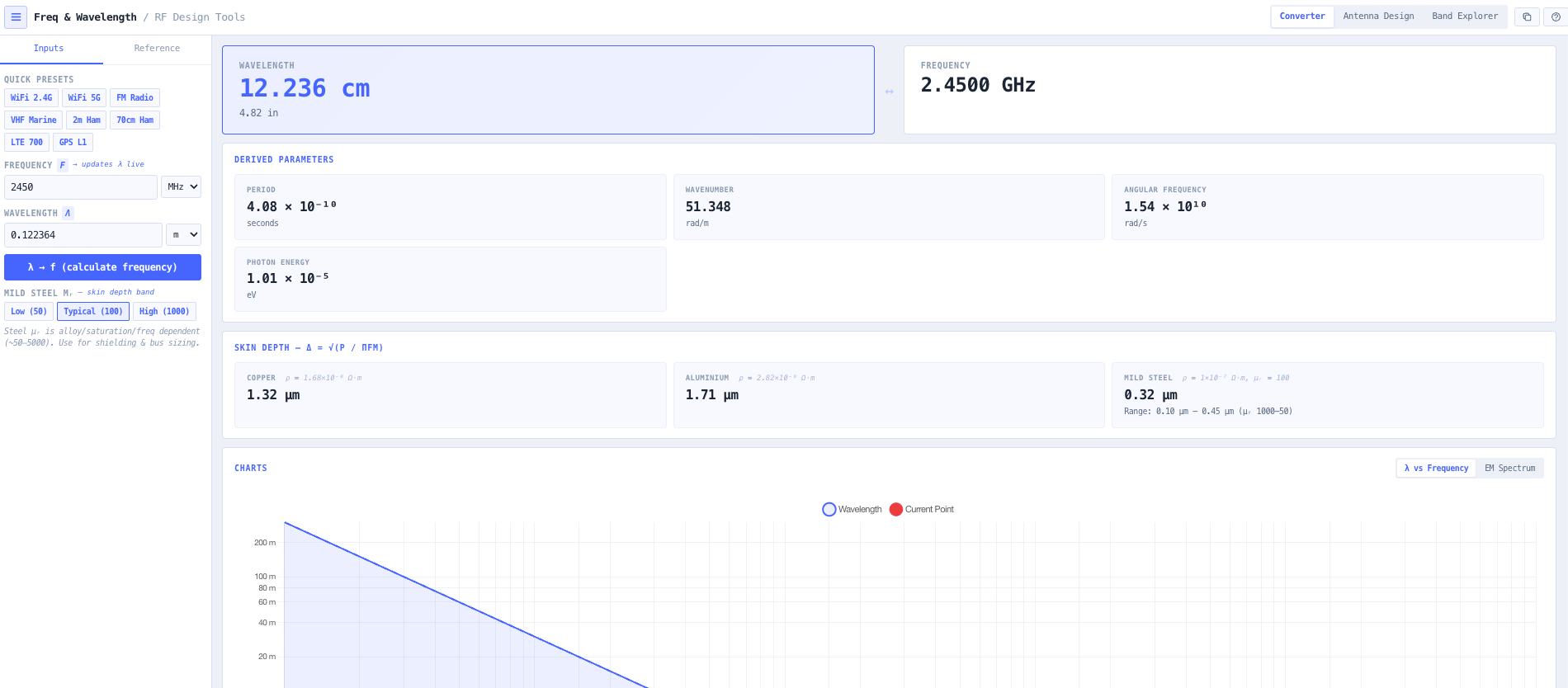
Antenna design is built in. Every conversion immediately surfaces the half wave (lambda over 2), quarter wave (lambda over 4), and 5/8 wave element lengths, giving you the dipole, monopole, and mobile antenna physical lengths without a second tool. Advanced electromagnetic parameters (period, wavenumber, angular frequency, photon energy) support academic work and deeper RF analysis. Automatic band identification names the radio service that owns the frequency you entered, with built in presets for WiFi 2.4 and 5 GHz, FM broadcast, VHF Marine, 2m and 70cm amateur, LTE 700, and GPS L1. An interactive electromagnetic spectrum view places your selected frequency in context against the full EM spectrum, useful for both professional reports and teaching.

Capabilities

Bidirectional frequency and wavelength conversion

Type a frequency and get the wavelength. Type a wavelength and get the frequency. Conversion uses the exact speed of light constant (299,792,458 metres per second) so output is engineering grade. Multiple unit formats including MHz, GHz, metres, and centimetres for compatibility with RF documentation standards.


Antenna element length calculator

Every conversion automatically returns the practical antenna dimensions. Half wave (lambda over 2) for dipoles. Quarter wave (lambda over 4) for monopoles and ground plane antennas. 5/8 wave for mobile antennas. Suitable for design, prototyping, and field deployment without reaching for a second tool.

Advanced electromagnetic parameters

Beyond conversion the tool returns period, wavenumber, angular frequency, and photon energy. These derived parameters support deeper electromagnetic analysis, academic work, advanced RF system modelling, and any application where the underlying wave physics matters rather than just the engineering shortcut.

Automatic band identification

Common radio services and frequency allocations are recognised automatically. Type 2400 MHz and the tool tells you it is the 2.4 GHz ISM band used for WiFi and Bluetooth. Type 462 MHz and it identifies UHF CB. Built in presets for WiFi 2.4 GHz, WiFi 5 GHz, FM broadcast, VHF Marine, 2m and 70cm amateur, LTE 700, and GPS L1 accelerate common engineering tasks.

Interactive electromagnetic spectrum explorer

Visualise exactly where your selected frequency sits within the electromagnetic spectrum, from radio through microwave, infrared, visible light, ultraviolet, X ray, and gamma. Useful for engineering reports that need to place a radio service in physical context, and as a teaching aid for electromagnetic fundamentals.

Engineering grade precision

Constants are stored at full IEEE precision. Output retains enough significant figures for RF engineering work rather than rounding at the conversion step. Suitable for inclusion in formal documentation, licence applications, and design submissions where input traceability matters.

Browser only computation

Runs entirely in your browser. No frequencies, designs, or coordinates are submitted to a server. Useful when working on commercially confidential designs or under information security policy that prohibits sending engineering data to third party services.

Standards & methodology

  • CODATA recommended value for the speed of light in vacuum (299,792,458 m/s)
  • ITU radio regulations frequency allocations (band identification reference)
  • ACMA Australian Radiofrequency Spectrum Plan (band identification reference)
  • IEEE radio band designations

When to use this tool

  • Designing dipole and monopole antennas at any frequency
  • Calculating mobile antenna element lengths for quarter wave and 5/8 wave configurations
  • Validating RF system specifications during design review
  • Exploring spectrum allocations for communications systems
  • Teaching electromagnetic wave fundamentals to students and graduates
  • Rapid unit conversion during frequency coordination tasks
  • Sanity checking antenna manufacturer datasheets against expected element lengths
  • Producing antenna design notes for licence applications
  • Identifying which radio service occupies an unfamiliar frequency
  • Converting between frequency and wavelength for academic and physics applications
  • Preparing teaching materials and example calculations for RF courses
  • Calculating photon energy for physics and applied science contexts

Is this the right tool for you?

Reach for the Frequency and Wavelength Calculator in any of the following situations.

  • You are designing a dipole, monopole, or mobile antenna and need the half wave, quarter wave, or 5/8 wave element length for your operating frequency.
  • You are looking at an unfamiliar frequency on a spectrum analyser or licence record and want to know which radio service or band it belongs to.
  • You are sanity checking an antenna manufacturer datasheet against the expected element length for the rated frequency.
  • You are converting between frequency and wavelength as part of a coordination, planning, or licence preparation workflow and want a precision tool rather than a rule of thumb estimate.
  • You are producing antenna design notes or licence application content and need engineering grade precision values for the documentation.
  • You are teaching RF engineering, physics, or electromagnetic theory and want an interactive tool that surfaces frequency, wavelength, and the electromagnetic spectrum together.
  • You are an amateur radio operator building a homebrew dipole, vertical, or mobile antenna and need element lengths that match your operating frequency.
  • You are working in a non engineering field (medical, industrial, scientific) and need to identify the band a particular frequency belongs to before contacting a regulator.
  • You are calculating photon energy for a physics, optics, or remote sensing application and want the wavelength and energy together.
  • You are validating that the wavelength assumed in a propagation calculation matches the operating frequency before relying on the result.
  • You need a quick band identification for an LTE, GPS, WiFi, FM, or amateur frequency without consulting a separate reference.
  • You are operating under a security regime that prohibits sending engineering data to third party services and need a calculator that runs entirely in your browser.
  • You are preparing teaching materials for an RF or electromagnetics course and want example calculations with consistent engineering grade precision.
  • You are working with photonics, infrared, or other non radio EM domains and need a tool that places your wavelength in the broader electromagnetic spectrum context.

Frequently asked questions

What constant is used for the speed of light?

The exact CODATA value for the speed of light in vacuum, 299,792,458 metres per second. This is the defined constant that fixes the metre, so conversions are exact rather than rounded at the speed of light step.

Which antenna lengths are returned?

Half wave (lambda over 2) suitable for dipoles, quarter wave (lambda over 4) suitable for monopoles and ground plane antennas, and 5/8 wave commonly used for mobile antennas. Output is the physical element length without velocity factor adjustment, so apply your specific cable or wire velocity factor for fine tuning at the construction step.

How does band identification work?

The tool checks the input frequency against a built in catalogue of common radio services and ITU and ACMA band allocations. If the frequency falls within a recognised band, the service name and typical use are returned. Built in presets for WiFi 2.4 and 5 GHz, FM broadcast, VHF Marine, 2m and 70cm amateur, LTE 700, and GPS L1 cover the most common quick lookups.

What advanced electromagnetic parameters are returned?

Period (1 over f), wavenumber (2 pi over lambda), angular frequency (2 pi f), and photon energy (h f, returned in eV and joules). These derived parameters support deeper electromagnetic analysis, academic work, and applications where the underlying wave physics matters rather than just the engineering values.

Does any data leave my browser?

No. The calculator runs entirely in your browser. No frequencies, designs, or coordinates are transmitted to a server. Useful when working on commercially confidential designs or under information security policies that prohibit sending engineering data to third party services.

Can I use it for non radio EM domains?

Yes. The frequency and wavelength relationship holds across the entire electromagnetic spectrum. The interactive spectrum view places your selected wavelength against radio, microwave, infrared, visible light, ultraviolet, X ray, and gamma. Photon energy output supports physics and applied science applications where the radio engineering vocabulary does not apply.

How precise is the output?

Constants are stored at full precision. Output retains enough significant figures for engineering work, including formal documentation, licence applications, and design submissions. The conversion itself is exact (because c is a defined constant), so the only precision limit comes from the input you provide.