Fiber Optic Design

PON Optical Budget Calculator

GPON, XG-PON, XGS-PON, and NG-PON2 optical link budget workstation. Downstream and upstream margin waterfalls, ITU-T budget classes, G.671 splitter loss, FEC coding gain, the ONT Rx operating window, max reach against TDMA and DBA limits, splitter ratio feasibility ranking, and live two-way sync with the PON Split Ratio Planner.

Overview

A passive optical network only works if the optical link between the OLT and every ONT on each PON port has enough power left after the splitter, the fiber, the connectors, and the splices have taken their share. The ITU-T fixes a class budget for the standard you are deploying, but that headline number is only the start. Once you subtract a G.671 splitter that can swallow 17 to 23 dB at high ratios, the fiber loss at the downstream and upstream wavelengths, the connector and splice contributions across the feeder, distribution, and drop, and an honest reserve for aging, repair, and temperature, the budget you actually have to work with is a different and much smaller figure. Get it wrong and an ONT either falls below sensitivity at the end of a long span or is driven into overload on a short drop near the OLT.

The noIM₃ PON Optical Budget Calculator is the optical-domain sister of the PON Split Ratio Planner. Where the Planner sizes ONTs, PON ports, line cards, and OLT shelves from a subscriber target, this tool verifies the link itself. It computes the downstream (OLT to ONT) and upstream (ONT to OLT) loss waterfalls for GPON, XG-PON, XGS-PON, and NG-PON2, surfaces the ONT Rx power against its sensitivity and overload thresholds, reports the worst-case margin and the effective budget side by side, and ranks every standard splitter ratio for feasibility on the current plant. The PON standard and the splitter ratio are shared state between the two tools, so changing either here flows across to the Planner live, with a sync-offer banner when the sister tool changes the shared state in another window.

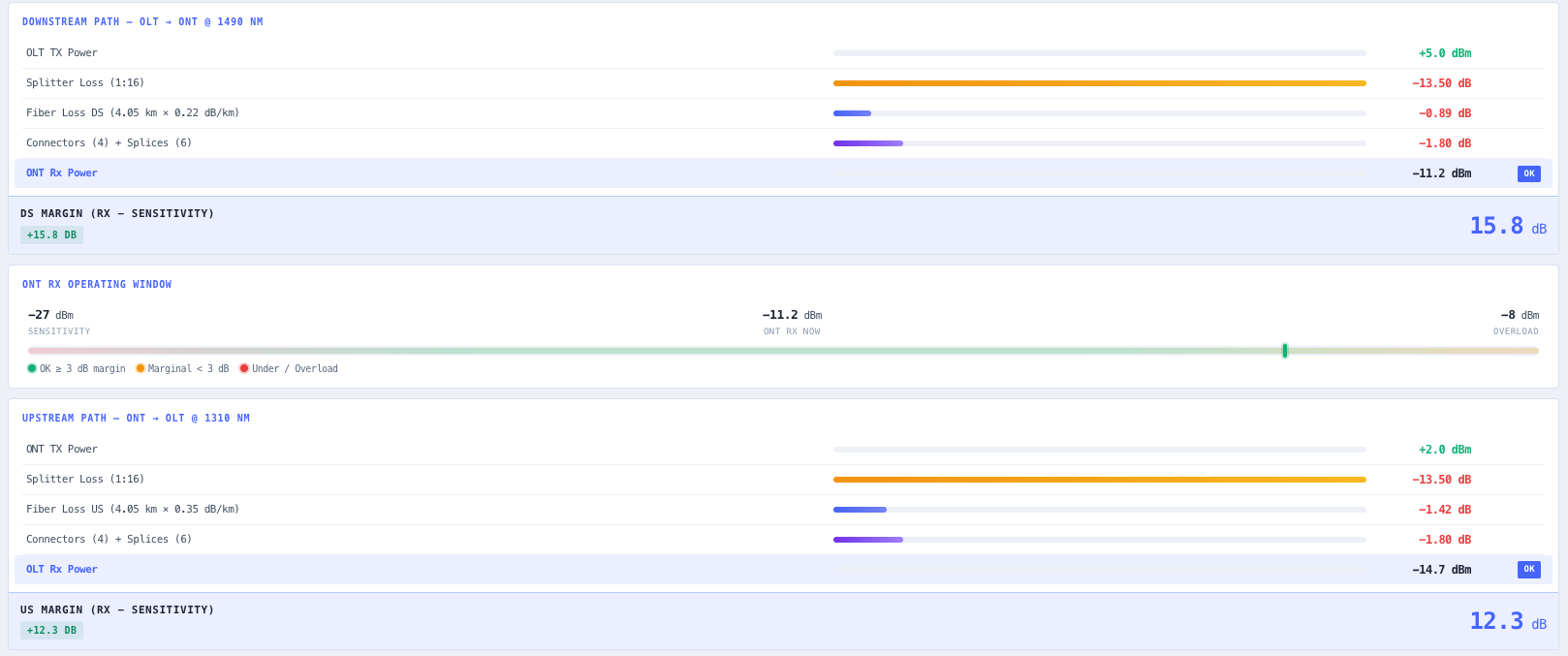
Both link directions are presented as constraint waterfalls, with every loss contributor as one bar-scaled row and the receive row highlighted as the binding result and tagged OK, UNDER, or OVERLOAD. A dedicated ONT Rx operating window plots the current Rx between sensitivity and overload on a colour-banded bar, the diagnostic view to reach for when an ONT reports an RSSI alarm in the field. Maximum optical reach is computed from the effective budget after splitter, passive, and FEC accounting, and compared against the standard typical (around 20 km) and extended-ranging maximum (around 40 km), flagging when the optical math allows further than the TDMA and DBA cycle constraints permit.

Capabilities

Downstream and upstream loss waterfalls

Both directions are presented as constraint-waterfall sections. Every loss contributor (splitter, fiber, connectors, splices, optional FEC coding gain) is one row with a bar scaled to the largest single loss in the path and a numeric loss value in dB. The receive row (ONT Rx for downstream, OLT Rx for upstream) is highlighted as the binding result and tagged OK, UNDER (below sensitivity), or OVERLOAD (above the overload threshold). The footer reports the margin (Rx minus sensitivity) with a coloured badge: green at 3 dB or more, amber for marginal, red for negative.

ITU-T budget classes and G.671 splitter loss

Budget class selection is scoped to the active PON standard. GPON exposes Classes A, B, B+, C, and C+ (20, 25, 28, 30, 32 dB), while XG-PON, XGS-PON, and NG-PON2 expose N1, N2, E1, and E2 (29, 31, 33, 35 dB). PLC splitter loss is a lookup against typical G.671 values that include about 1 to 1.5 dB excess loss above the ideal 10·log₁₀(N): 1:4 ≈ 7 dB, 1:8 ≈ 10.5 dB, 1:16 ≈ 13.5 dB, 1:32 ≈ 17 dB, 1:64 ≈ 20.3 dB, 1:128 ≈ 23.6 dB. Unknown ratios fall back to the theoretical formula plus a 1.5 dB excess-loss reserve.

Wavelength-aware fiber attenuation per standard

Each PON standard carries its own downstream and upstream wavelengths (GPON 1490/1310 nm, XG-PON and XGS-PON 1577/1270 nm, NG-PON2 1596/1270 nm). Default downstream and upstream attenuation is seeded from these wavelengths when the standard is selected, and can be overridden when the cable spec or measured OTDR data is known. The total fiber span (feeder plus distribution plus drop) is multiplied by the relevant per-direction attenuation to give the fiber loss components of each waterfall.

FEC coding gain (off, conservative, nominal)

Forward Error Correction adds a coding gain to the downstream link only, since the FEC overhead consumes upstream headroom rather than producing it. Three modes are exposed: Off (0 dB), Conservative (+1 dB, recommended for budgeting), and Nominal (+2 dB, vendor and implementation specific). The conservative default avoids over-committing budget the specific transceiver may not deliver.

System design margin decomposition

Rather than collapsing system reserve into a single number, the panel exposes the three components separately so the design rationale is auditable. Aging margin reserves dB for transceiver and fiber ageing over the deployment life (typically 0.5 dB), repair margin reserves for splice repairs at fault locations (typically 0.5 dB), and temperature margin reserves for outdoor cabinet thermal swing (typically 0.3 dB). The sum is subtracted from the ITU-T class budget to give the effective budget shown in the headline pair.

ONT Rx operating window

A dedicated operating window strip plots the current ONT Rx between the sensitivity and overload thresholds on a colour-banded bar. The pointer colour matches the operating state: green for 3 dB or more margin, amber for marginal, red for under (below sensitivity) or overload (above the overload threshold). This is the diagnostic view to use when an ONT is reporting an RSSI alarm in the field or when a short-fiber drop near the OLT risks driving the ONT into compression.

Max reach against TDMA and DBA cycle limits

Maximum optical reach is computed from the effective budget after splitter, passive, and FEC accounting, divided by the downstream attenuation. The result is reported alongside the standard typical reach (around 20 km) and the standard maximum (around 40 km, requiring extended-ranging configuration). When the optical math allows further than the TDMA and DBA cycle limits permit, a warning surfaces explicitly: the optical link could carry the signal, but the protocol layer cannot bound ranging at that distance without explicit reconfiguration.

Splitter ratio feasibility ranking

Every standard splitter from 1:4 to 1:128 is evaluated against the current fiber plant and passives in a feasibility table. Each row reports the splitter loss, total path loss, margin against the available budget, and a feasibility badge. The selected splitter is highlighted. The table makes the cost and capacity trade visible directly: a smaller splitter has more headroom for longer spans, while a bigger splitter serves more ONTs from each PON port but reduces optical reach.

Live two-way sync with the PON Split Ratio Planner

The PON standard and the splitter ratio are shared state with the PON Split Ratio Planner via a dedicated local-storage key. Change either of them here and the Planner picks them up, and the same in reverse. A cross-tab storage listener surfaces a sync-offer banner when the sister tool changes shared state in another window, with a single click to accept the new values. The Planner button in the top bar opens the sister tool with the current state pre-loaded.

Standards & methodology

  • ITU-T G.984 GPON (downstream 1490 nm, upstream 1310 nm, Classes A, B, B+, C, C+)
  • ITU-T G.987 XG-PON (1577/1270 nm, Classes N1, N2, E1, E2)
  • ITU-T G.9807 XGS-PON (1577/1270 nm, Classes N1, N2, E1, E2)
  • ITU-T G.989 NG-PON2 (1596/1270 nm, Classes N1, N2, E1)
  • ITU-T G.671 typical PLC splitter insertion loss with excess-loss reserve

When to use this tool

  • Verify that a planned GPON, XG-PON, XGS-PON, or NG-PON2 link has positive margin in both downstream and upstream directions
  • Pick the right ITU-T budget class (B+, C+, N2, E1, and so on) for a given fiber plant and splitter ratio
  • Detect near-end ONT overload at short-fiber drops and size optical attenuators before commissioning
  • Decide between 1:32 and 1:64 splitter ratios from optical headroom rather than capacity alone
  • Confirm a planned feeder plus distribution span fits inside the chosen budget class
  • Audit a vendor-supplied PON design against an independent ITU-T budget model with all reserves visible
  • Plan the extended-ranging configuration required to push beyond 20 km on GPON or XG-PON
  • Diagnose an in-service ONT RSSI alarm against the operating window and recompute margin from measured ground truth
  • Decide the FEC mode (off, conservative, nominal) for a marginal link with no transceiver headroom to spare
  • Hand off the optical design to the PON Split Ratio Planner with the standard and splitter ratio pre-loaded
  • Iterate fiber length, splitter ratio, and passives quickly to find the highest splitter feasible on the plant
  • Produce a copy-paste audit string of the full downstream and upstream budget for a design pack

Is this the right tool for you?

Reach for the PON Optical Budget Calculator in any of the following situations.

  • You are designing a GPON Class B+ network with a 1:32 splitter and need to confirm the ONT Rx stays inside its operating window across the longest drop on the PON port.
  • You have a short-fiber drop close to the OLT and need to check whether the ONT will be driven into overload before you commission the link.
  • You are choosing between a 1:32 and a 1:64 splitter and want to see which one the optical plant actually supports before committing to the capacity gain.
  • You are deciding which ITU-T budget class (B+, C+, N2, or E1) a given feeder, distribution, and drop plant with a fixed splitter ratio falls into.
  • You are pushing a GPON or XG-PON link beyond 20 km and need to know whether the optical reach is limited by the budget or by the TDMA and DBA cycle constraints.
  • You received an ONT RSSI alarm from the field and want to plot the measured Rx against the operating window and recompute the margin from ground truth.
  • You are auditing a vendor-supplied PON design and need an independent ITU-T budget model with the aging, repair, and temperature reserves shown explicitly.
  • You have a marginal link with no transceiver headroom and need to decide whether conservative or nominal FEC mode closes the downstream budget.
  • You have verified the optical budget and want to hand the design to the PON Split Ratio Planner with the standard and splitter ratio already loaded.
  • You are documenting a PON design pack and need the full downstream and upstream budget, class, reserve, margin, and reach as a copy-paste audit string.

Frequently asked questions

Which PON standards and budget classes are supported?

GPON (ITU-T G.984) with Classes A, B, B+, C, and C+ at 20, 25, 28, 30, and 32 dB; and XG-PON (ITU-T G.987), XGS-PON (ITU-T G.9807), and NG-PON2 (ITU-T G.989) with Classes N1, N2, E1, and E2 at 29, 31, 33, and 35 dB. The budget class picker is scoped to whichever standard is active, and the class budget in dB is surfaced live next to the picker.

How is the splitter insertion loss calculated?

Splitter loss is a lookup against typical G.671 PLC values that already include about 1 to 1.5 dB of excess loss above the ideal 10·log₁₀(N): 1:4 ≈ 7 dB, 1:8 ≈ 10.5 dB, 1:16 ≈ 13.5 dB, 1:32 ≈ 17 dB, 1:64 ≈ 20.3 dB, 1:128 ≈ 23.6 dB. Ratios outside this set fall back to the theoretical 10·log₁₀(N) formula plus a 1.5 dB excess-loss reserve.

Why does FEC only help the downstream link?

Forward Error Correction adds a coding gain to the downstream direction only, because the FEC overhead consumes upstream headroom rather than producing it. Three modes are exposed: Off (0 dB), Conservative (+1 dB, recommended for budgeting), and Nominal (+2 dB, which is vendor and implementation specific). The conservative default avoids over-committing budget that the specific transceiver may not deliver.

What is the difference between the class budget and the effective budget?

The class budget is the maximum allowable link loss between the OLT TX and the ONT Rx per the ITU-T specification for the selected class. The effective budget is the class budget minus the total system reserve, where the reserve is the sum of the aging (typically 0.5 dB), repair (typically 0.5 dB), and temperature (typically 0.3 dB) margins. The effective budget is the headroom the optical plant actually has to work with over the deployment life of the network, and it is shown alongside the worst-case margin in the headline pair.

How is the maximum optical reach computed, and why the TDMA and DBA warning?

Maximum optical reach is computed from the effective budget after splitter, passive, and FEC accounting, divided by the downstream attenuation, and is compared against the standard typical reach (around 20 km) and the extended-ranging maximum (around 40 km). When the optical math allows further than the TDMA and DBA cycle limits permit, a warning surfaces explicitly: the optical link could carry the signal, but the protocol layer cannot bound ranging at that distance without explicit extended-ranging reconfiguration.

How does the splitter ratio feasibility table work?

Every standard splitter from 1:4 to 1:128 is run against the current fiber plant and passives. Each row reports the splitter loss, total path loss, margin against the available budget, and a feasibility badge, with the selected splitter highlighted. The table makes the cost and capacity trade explicit: a smaller splitter has more headroom for longer spans, while a bigger splitter serves more ONTs from each PON port but reduces optical reach.

How does the sync with the PON Split Ratio Planner work?

The PON standard and the splitter ratio are shared state between this tool and the PON Split Ratio Planner via a dedicated local-storage key. Change either of them here and the Planner picks them up, and the same in reverse. A cross-tab storage listener surfaces a sync-offer banner when the sister tool changes the shared state in another window, and the Planner button in the top bar opens the sister tool with the current state pre-loaded.